
Eight of the ten strongest local pack ranking factors come straight out of your Google Business Profile, according to Whitespark's 2026 Local Search Ranking Factors report. Not your website. Not your backlinks. Your profile.
That should be good news, because a Business Profile is free and you control almost all of it. The problem is that nearly every optimization guide online hands you a flat checklist of thirty items with no sense of which ones matter. So people spend six months posting weekly updates and uploading photos, then wonder why a competitor two miles away still outranks them.
This guide ranks the work by measured impact. You'll get the checklist in the order the data says to do it, plus three things almost nobody covers: what happens when Google suspends your profile, how service-area businesses differ, and why your rank is a map rather than a number.
Quick tip
Build and verify your Google listing first. Then sign in to Bing Places with that same Google account and import it. Your name, address, hours, phone, categories and photos copy straight across, and you can set it to keep syncing.
Key Takeaways
- Google Business Profile signals carry the heaviest group weighting in local pack rankings, and eight of the ten strongest individual factors come from the profile itself (Whitespark, 2026)
- The single strongest individual factor is your primary category, followed by address proximity and keywords in your business title
- 74% of consumers only consider reviews written in the last three months, and 32% only look at the last two weeks (BrightLocal, 2026)
- 68% of consumers will only use a business rated four stars or higher, up from 55% a year earlier (BrightLocal, 2026)
- Google states plainly that there is no way to request or pay for a better local ranking
- Your website and your profile are graded together: on-page signals are their own sizeable group, and a category that your site doesn't back up is a weaker signal than it looks
- Google blocked or removed 292 million policy-violating reviews and restricted 782,000 accounts in 2025. Buying reviews usually gets you throttled rather than suspended, which is worse, because it quietly filters the real reviews you earn afterward
- 45% of consumers now use AI tools to find local businesses, up from 6% in 2025, making AI the third-largest discovery channel (BrightLocal, 2026)
What is Google Business Profile optimization?
Google Business Profile optimization is the work of configuring your free Google listing so it appears more often, and higher, in the local pack and on Google Maps. Google itself names three inputs: relevance, distance, and prominence. Relevance is how well your profile matches the search. Distance is how far you are from the searcher. Prominence is how well known your business is, which Google says includes how many websites link to you and how many reviews you have.
There's a distinction worth drawing early, because it's where most businesses stall. A complete profile has every field filled in. An optimized profile has the high-weight fields filled in correctly and the low-weight fields filled in quickly. Those are different jobs, and only one of them changes your ranking.
Worth saying out loud, since it's one of the most common questions on this topic: you cannot buy your way into the local pack. Google Ads can place you above it. Nothing places you inside it except the ranking factors below.
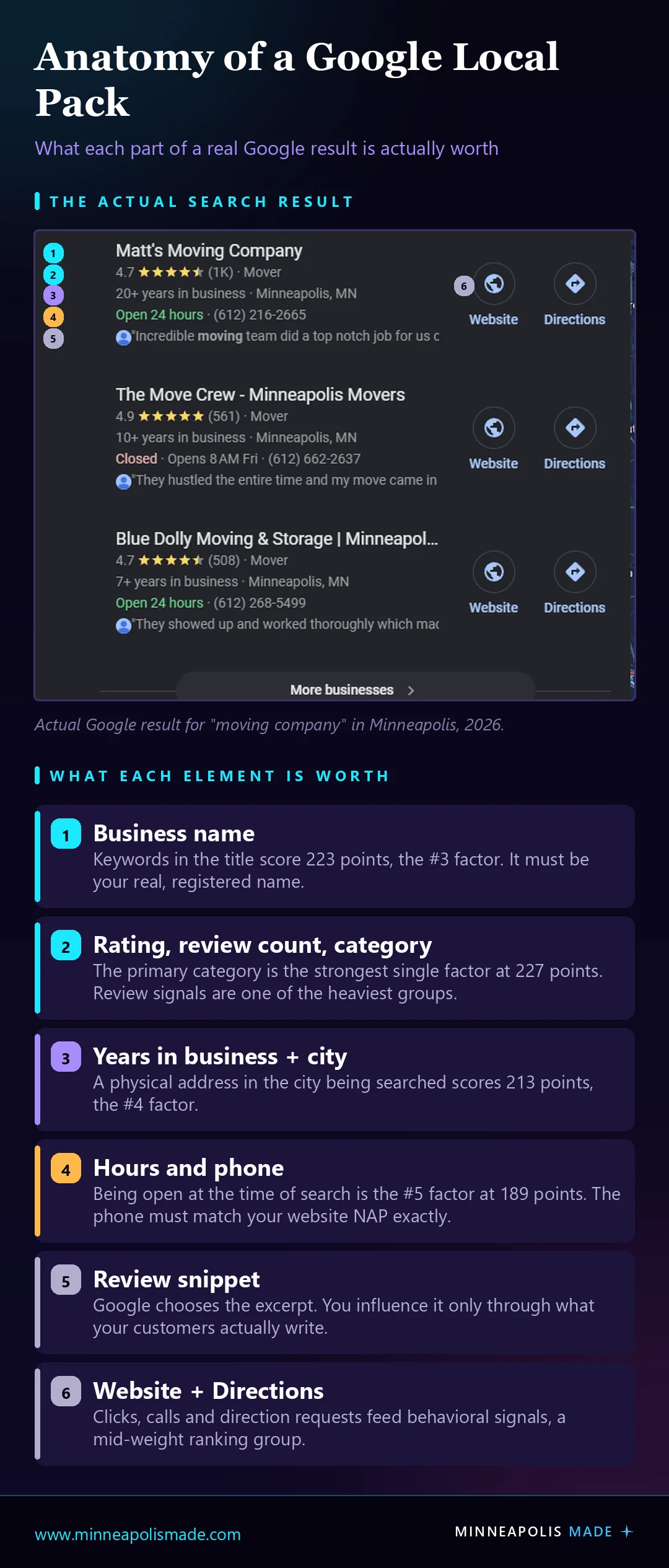
Look at the second result. The Move Crew carries a 4.9 rating against Matt's 4.7, and it still placed second. The most visible difference between them at the moment of that search is that The Move Crew was closed and Matt's was open. Being open at the time of search is the fifth-strongest factor at 189 points, and here it is outweighing a three-tenths rating advantage in a live result.

What actually determines Google Maps rankings in 2026?
Google Business Profile signals carry the highest group weighting of any category, per Whitespark's 2026 report, which surveyed 47 local search practitioners and was published in November 2025. Review signals are close behind and rose sharply in this edition. On-page signals, links, and behavioral signals form the middle of the pack, while citations, personalization, and social sit at the bottom.
Two things jump out of that distribution. First, your profile and your reviews together outweigh everything else combined. Second, citations, which is the directory-listing work that local SEO packages have been billing for since roughly 2011, sit near the bottom of the list. They still matter. They are not where your first hundred dollars should go.
Zoom into the individual factors and the picture gets sharper still. Whitespark scores each one, and the top of the list is remarkably boring:
- Primary Google Business Profile category (227 points)
- Proximity of your address to the point of search (225)
- Keywords in your business title (223)
- Physical address in the city being searched (213)
- Business is open at the time of search (189)
- High numerical Google rating (181)
- Address showing on the profile (176)
- Additional profile categories (173)
- Quantity of native Google reviews with text (170)
- Proper placement of the map pin (165)
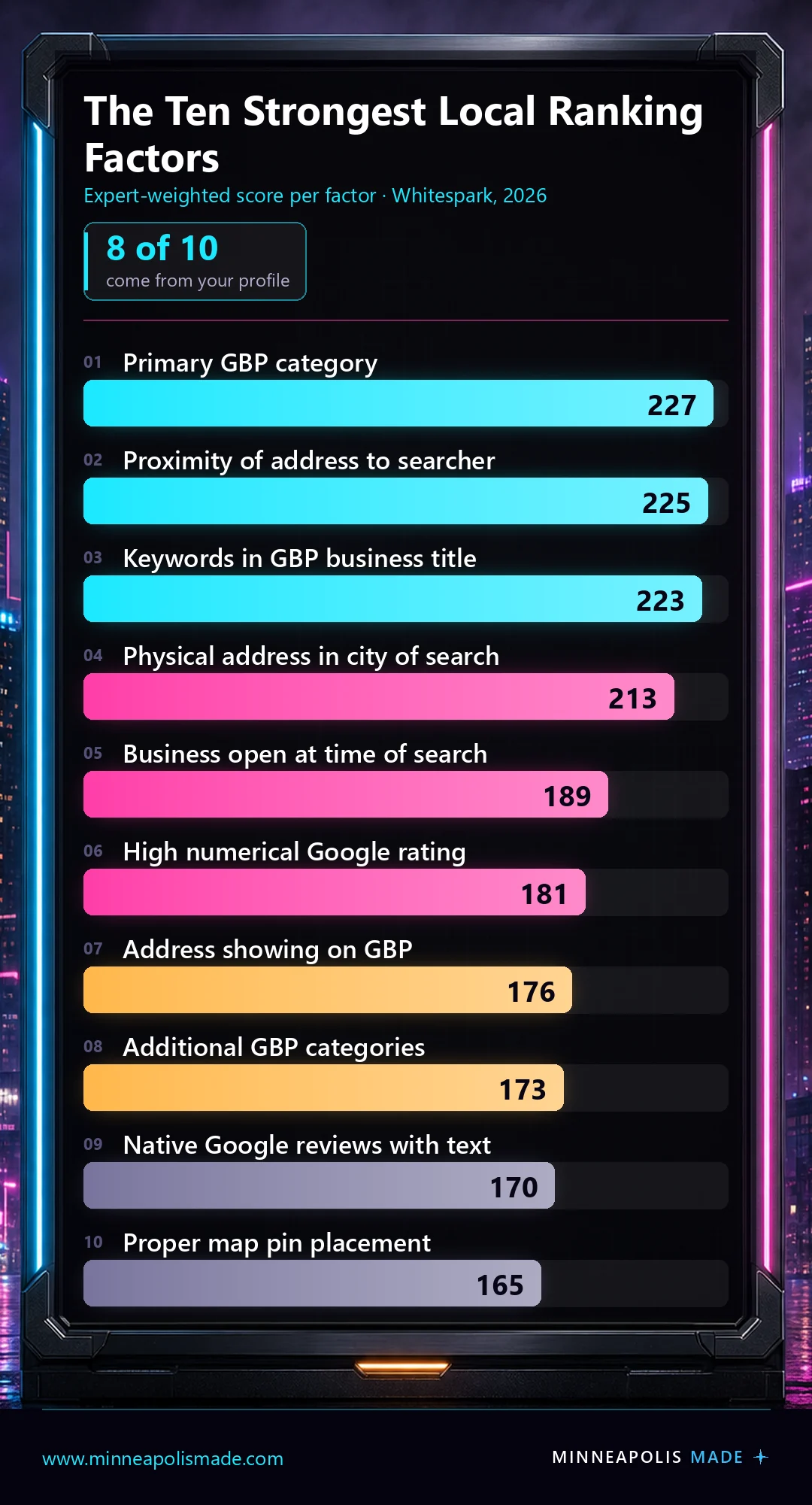
Look at what isn't there. No Google Posts. No photo count. No 750-character description packed with keywords. Those are the three things most optimization checklists lead with, and none of them cracks the top ten. The list is almost entirely category, address, name, hours, and reviews. If you did nothing but get those five right and ignored every other tactic in this article, you would outperform most of your competitors.
How do you choose the right primary category?
Your primary category is the highest-scoring individual ranking factor in the 2026 data at 227 points, ahead of even physical proximity. It's also the field people most often get wrong, because the obvious answer is frequently not the right one.
Google uses your primary category to decide which searches you're eligible for at all. Pick "Contractor" when your money is in roof replacement and you've opted out of the searches that convert. The category list is fixed, you can't invent one, and the exact wording matters more than it looks.
Related: How we approach SEO for Minneapolis businesses
The practical method: search your main money keyword from within your service area, then check what primary category the top three local pack results use. You can see it on any profile in the knowledge panel. If all three use the same category and you use a different one, that's your answer, and it's usually a fifteen-minute fix.
Add secondary categories after that, since additional categories rank eighth at 173 points. Be honest about them. Categories you don't actually serve dilute relevance and, as the suspension section covers, give Google a reason to look harder at your profile.
Do your business name and address really matter that much?
Four of the top ten factors are name, address, or pin placement: proximity at 225 points, keywords in the title at 223, physical address in the city of search at 213, address showing on the profile at 176, and pin placement at 165. Together they outweigh every content tactic on your website.
Keywords in your business title genuinely work, which creates an obvious temptation and a real hazard. Google's guidelines require your profile name to be your actual business name as it appears in the real world, on your signage, and in your legal registration. Adding "Minneapolis Plumbing Repair" to the end of a name that isn't legally that is a guideline violation, and it's one of the more common triggers for suspension.
The legitimate version of this play is to make the keyword-bearing name your real name. If your registered DBA includes what you do, you're entitled to use it.
Personal ExperienceWe went through this ourselves. I've been writing "Minneapolis Made" on things since 1984, on high school notebooks and on stickers I made. Not a business, nothing official, just a name I liked enough to keep using. Decades later it became the actual company: we hold the .com and the business is registered with the State of Minnesota. Then another company in the same industry started operating under the same name, and the confusion was immediate. People could not tell which Minneapolis Made was which.
So we registered the longer name, Minneapolis Made Web Design Company & SEO Agency, and that is now the legal name on the profile. It solved the confusion problem first and the ranking problem second. The descriptive words are not stuffing, they are the registered name, which is exactly the distinction Google's guideline turns on.
The lesson for anyone weighing the same move: don't append keywords to your Google listing and hope nobody notices. If a longer, more descriptive name genuinely serves your business, register it properly, put it on your signage and your website, and then use it. The paperwork is what makes it defensible, and it's what your appeal rests on if the profile is ever challenged.
Related: Google Business Profile basics for law firms
What about service-area businesses?
If you're a plumber, roofer, electrician, or anyone else who travels to customers, the rules shift. You hide your address and define service areas instead. That resolves a genuine conflict: proximity to the searcher is the second-strongest factor, but a hidden address means Google ranks you from your registered location, not from the middle of your service map.
The practical consequence is that a service-area business ranks in a tight radius around wherever it's registered, and drops off fast beyond it. Suburban coverage isn't a matter of listing more service areas. Service areas control where you're eligible, not where you're strong. This is the single most misunderstood thing in local SEO for trades, and it's why the next section on measurement matters so much.
Related: How we approach marketing for home services businesses, including plumbers, roofers, HVAC and electricians
Does what's on your website affect your Google Business Profile?
Yes, and this is the connection almost nobody makes. On-page signals are their own weighted group in the 2026 Whitespark data, ranking above citations. Your website is not a separate project from your profile. Google reads both and compares them.
The mechanism is straightforward once you see it. Google pulls the language off your web pages and measures it against what your profile claims to be. If your profile's primary category is "Roofing Contractor" but your website talks mostly about gutters, siding, and general remodeling, you have handed Google two different answers to the same question. Relevance is one of the three factors Google names outright, and relevance is judged across everything Google can see about you, not just the profile fields.
Unique InsightThis runs in both directions, which is the useful part. Fixing your primary category is a fifteen-minute job, but it only pays off fully if your site backs the claim up. The pairing is what works: pick the category that matches your money keyword, then make sure your homepage and your main service page speak that same language in plain terms. A category change with a mismatched website is a weaker signal than most people expect, and it's why some businesses swap categories, see nothing happen, and conclude categories don't matter.
Related: Minneapolis web design that supports your local rankings
The NAP detail that quietly breaks listings
NAP stands for name, address, and phone, and the rule is that all three should read identically everywhere Google finds them: your profile, your website, your citations, your schema. Not similar. Identical. "Suite 838" on your site and "STE 838" on your profile is the kind of small mismatch that adds friction to a signal you want clean.
The phone number is where this gets genuinely tricky, because most businesses running any paid advertising want a call tracking number so they can tell which channel produced the call. That's a reasonable thing to want, and it's where a lot of listings quietly go wrong.
Read that carefully, because it cuts against advice you'll see repeated on a lot of call tracking vendor blogs. Profiles support additional phone numbers alongside the primary, and the common recommendation is to put the tracking number in the primary field and your real local number in the additional field. That configuration is widely used and it does preserve the tracking. But Google's own wording is about numbers that redirect users somewhere other than the actual business, which is precisely what a tracking number does.
The conservative setup, and the one we'd default to for a local service business: your real local number in the primary field, matching your website exactly, with the tracking number added as the additional number. You keep NAP consistency where it's load-bearing and you still get attribution. If you'd rather run tracking as the primary, understand you're taking a documented policy risk to do it, and that your real number must be on the profile either way.
How many Google reviews do you actually need?
Review signals are one of the heaviest groups in the 2026 Whitespark data and climbed sharply in this edition, and 97% of consumers read reviews for local businesses, per BrightLocal's 2026 Local Consumer Review Survey. But the question "how many do I need" is the wrong question, because the survey's most useful finding is about timing rather than volume.
That reframes the work. A steady trickle of reviews beats a burst. Ten reviews a quarter, forever, outperforms fifty reviews last spring and silence since.
Star thresholds tightened sharply in a single year too. 68% of consumers say they'll only use a business rated four stars or higher, up from 55% in 2025. 31% now require 4.5 or better, nearly double the 17% who said so a year earlier. Consumers are getting less forgiving fast, and the gap between a 4.3 and a 4.6 is no longer cosmetic.
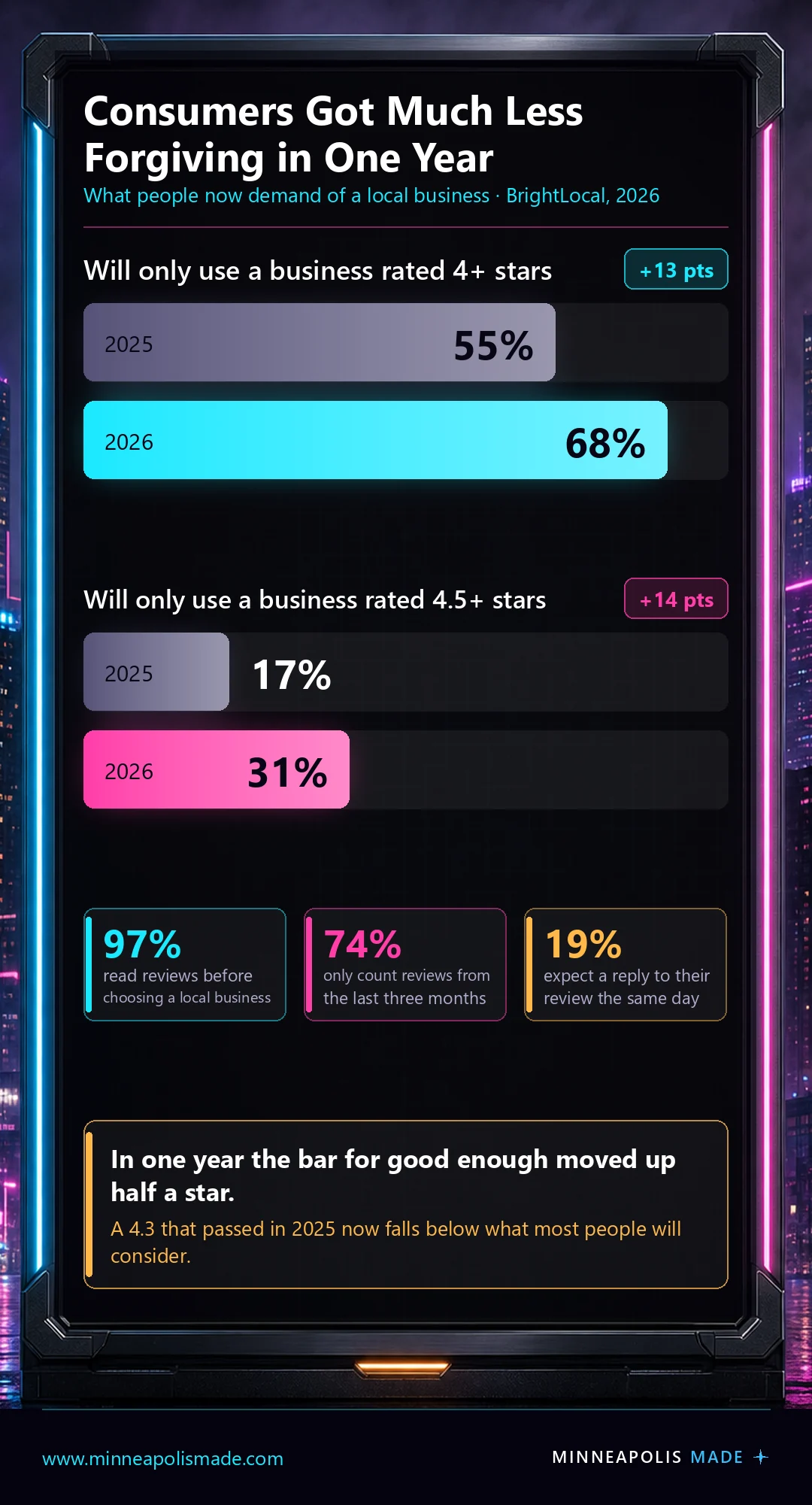
Response speed has moved as well: 19% of consumers now expect a same-day reply to their review, up from 6% a year ago. Replying is also one of the few review-side actions entirely within your control, unlike the reviews themselves.
One more finding worth planning around. Google's share of reviews dropped from 83% in 2025 to 71% in 2026, and consumers now consult an average of six different review sources before choosing a business. Google is still the center of gravity. It's no longer the whole map.
Not sure where your reviews actually stand against the shops you compete with?
We'll pull your rating, review velocity, and recency against the businesses ranking above you in the local pack, and tell you which number is costing you calls.
Related: What local SEO actually costs in Minneapolis
What actually happens when a business buys Google reviews?
Google blocked or removed more than 292 million policy-violating reviews in 2025, placed posting restrictions on over 782,000 accounts, and took down more than 13 million fake Business Profiles, according to Google's April 2026 Maps trust and safety update. Buying reviews is not a clever edge. It is one of the most heavily policed behaviors on the platform.
The thing most people miss is why it's so easy for Google to see. Leaving a review requires being signed in to a Google account, and that account carries a history: where it has been, what else it has reviewed, when it was created, what device it's on, what other accounts it resembles. A business doesn't buy reviews so much as it introduces a cluster of accounts that behave nothing like real customers, all pointing at one profile in a short window. That pattern is legible from Google's side in a way it simply isn't from yours.
Here's the part that catches businesses off guard, and it's why the damage outlasts the tactic. The usual consequence isn't suspension. It's throttling. Once a profile looks like it has been manipulated, Google stops extending it the benefit of the doubt, and the filtering gets applied more aggressively going forward. Legitimate reviews from real customers start disappearing along with the bought ones, because the profile is now being verified harder than a clean one would be. We have seen businesses spend months wondering why perfectly genuine reviews keep vanishing, without connecting it to a batch they purchased a year earlier.
That's the actual trade. You are not risking a dramatic ban you'd notice and could appeal. You are risking a permanent tax on every real review you earn afterward, applied quietly, with no notification and nothing to appeal. Reviews are one of the heaviest ranking categories, so a throttled review profile is expensive in exactly the place it hurts most.
Worth knowing too: Google's policy prohibits merchants from asking staff to solicit a set number of reviews, and from asking for reviews that name a specific staff member. If your team has a monthly review target, or your review request asks customers to mention the tech who did the work, that is a policy violation rather than a clever incentive. Source: Google Maps User Generated Content Policy.
Does it matter where your reviewers live?
It does, and it's one of the least-discussed ways an otherwise honest review push can look wrong. Google's policy is that a contribution should reflect "a genuine experience at a place or business," and geography is one of the plainest tests of whether that's true.
Think about what a review implies. If you're a painting company working out of Minneapolis and a review arrives from an account whose entire history sits in Florida, praising the job you did on their Minneapolis home, the two facts don't sit comfortably together. One or two is nothing. A pattern of them is a profile that looks assembled rather than earned.
So when you're asking for reviews, ask the customers who are actually in your service area. For a Minneapolis business that means Minneapolis, St. Paul, the surrounding suburbs, Minnesota generally. It sounds obvious written down, and it gets violated constantly the moment a business owner asks friends, family, and old contacts scattered across the country to "leave a quick review" as a favor. Those are the reviews that read as suspicious, and they're usually offered with entirely good intentions.
Unique InsightThe nuance worth holding onto is that local and national can legitimately mix. If you genuinely serve clients in multiple states, reviews from those states are real and belong on your profile. A software company or a consultancy with clients across the country should have geographically scattered reviews, because that's what its customer base actually looks like. The test isn't "are my reviewers local," it's "does the geography of my reviews match the geography of my work." For a painting company in Minneapolis, those are the same question. For a national firm with a Minneapolis office, they are not.
Do posts, photos, and the description actually help?
Behavioral signals are a mid-weight group in the 2026 data and have been climbing, so the honest answer is yes, a little, indirectly, and far less than the checklists imply. None of the individual tactics in this section appears in the top ten factors.
Here's the mechanism that makes them worth any time at all. Behavioral signals include clicks, calls, direction requests, and photo views. Posts and photos don't rank you directly. They make a person who already found you more likely to act, and those actions feed the behavioral bucket. It's a second-order effect, and second-order effects are real but slow.
So: keep your photos current and genuine, because photo views are a behavioral signal and stock imagery of someone else's storefront helps nobody. Post when you have something to say. Write your description for the human reading it.
On that last point, you'll see a widely repeated claim that top-ranking profiles have descriptions of around 70 words, drawn from a scrape of roughly two million profiles. It's worth knowing what that number is and isn't. It's a correlation pulled from profiles that already rank well. It doesn't establish that trimming your description to 70 words moves you up, and the description doesn't appear anywhere in the top ten factors. Treat it as trivia, not a target.
Unique InsightThe reason this matters is opportunity cost. Every hour on weekly posts is an hour not spent fixing a wrong primary category, correcting a misplaced map pin, or building a review request into your invoicing. Those are top-ten factors. Posting is not. Most local SEO retainers are priced around producing visible activity, and posts are extremely visible.
What happens if your Google Business Profile gets suspended?
Suspension is the risk that almost no optimization guide mentions and every local business should understand, because it takes you from ranking to invisible with no warning and no phone number to call. Your profile disappears from Maps and the local pack, and you find out when the calls stop.
Common triggers include a business name that doesn't match your legal or signage name, a virtual office or coworking address, a service-area business that also displays a street address, categories that don't match what you actually do, and sometimes nothing you can identify at all. Editing several sensitive fields at once, particularly name, address, and category together, is a well-known way to draw a review.
The appeal process runs through Google's Business Profile support flow, and it rewards documentation over argument. Registration paperwork, a utility bill at the address, signage photos, and anything else tying the name and location to physical reality.
Register from your phone, on cellular data, not from your desk
This is the least-known thing in this entire article, and it costs nothing to get right. Google's video verification must be "recorded and uploaded from a mobile device through your Business Profile," captured live, unedited, and at least 30 seconds long. Pre-recorded video is not accepted. So a phone is not optional at the verification step.
Go one step further and turn Wi-Fi off before you register or verify. Here's the reasoning. A desktop on Wi-Fi geolocates through your router and your ISP's network, and that resolves to a hub that can sit blocks or even miles from your actual door. A phone on cellular data with location services on reports your real latitude and longitude, at the address you're claiming.
Unique InsightThink about what Google is trying to answer during verification: is this person actually standing at the place they say they are? Every signal that says yes makes the profile easier to trust, and every signal that says "this claim came from somewhere across town" adds friction. We treat registering and verifying from a phone, on cellular, physically standing at the location, as the default. It is not documented as a ranking factor and we are not claiming it is one. It is a trust signal, and trust is what the whole verification step is about.
The verification video, shot by shot
Google asks for at least 30 seconds of live, unedited footage, and in practice you want to land between 30 and 40 seconds. Longer videos do not help you. The reviewer is looking for a specific set of proofs, and a rambling four-minute tour makes those proofs harder to find, not easier.
Personal ExperienceFirst, a platform trap that has cost people hours. On an iPhone, record the video inside the Google Maps app. Not Chrome, not the Google app. Through the other two the flow breaks down and you cannot even reach the buttons you need. There's no error message explaining this, so it reads as a bug in your phone rather than the wrong entry point.
Then shoot it in this order, without stopping the recording:
- Start outside the building. Capture the street and the cross streets so the location is placeable in the real world.
- Show the entrance, and unlock it on camera. If the building is locked, show that it's locked, then use your key or fob to unlock it and walk into the lobby. Do not let someone buzz you in and do not follow another person through. The point is that you can get in on your own.
- Find yourself on the directory. In a larger office building, film your business on the directory board. Anywhere else, film your permanent signage. The name has to match your profile exactly.
- Prove you have access. Before you record, make sure your own door is locked. Then on camera, pull the handle to show it's locked, put the key in, turn it, and go in. That sequence is the proof of management, and it's the part people most often skip.
Keep your signage visible as you move, and keep moving. Outside to cross streets, to lobby, to directory, to locked door, to key, to inside, in roughly half a minute. That's the whole assignment.
Original DataHere is our own suspension, and it is not a tidy story with a happy ending. We re-registered the profile at an apartment address. Google did not like that, and the profile was hard suspended. We then went to register at the Lumber Exchange Building, where the office actually is, and confusion followed. The result today is two listings, and Google will not remove the one that shouldn't exist. We have tried repeatedly.
We're publishing that because most guides on this topic end with "file an appeal and you'll be fine." Sometimes you are. Sometimes you end up with a duplicate you cannot kill, a support process with no human on the other end, and no explanation. Registering a business with Google is not always cut and dry, and anyone telling you it's a fifteen-minute task hasn't been through a bad one.
What Google actually checks, and what Apple does instead
Verification got materially harder once Google worked out how many listings were running out of virtual offices and coworking mailboxes from providers like Regus and DaVinci. The screening tightened in response, and legitimate businesses in shared buildings got caught in the same net.
What the review actually looks at is physical and mundane. Signage, with your business name on a permanent fixture like a signboard, wall, or window, and that name matching your profile exactly, which is also where a keyword-stuffed title gets caught. Whether anyone is actually there. How easy the business is to access. And proof of management, meaning something only a person who works there could do, like opening a locked space or producing a permit or utility bill in the business name.
Personal ExperienceGoogle does all of that remotely, through video. Apple does not. Apple sends an actual person to your door. Ours showed up while I was in a meeting with a client. I only knew because I saw them on the building cameras. We're in a secured building in downtown Minneapolis, which means a stranger cannot simply walk up to the office, and the visit ended with our Apple Maps inclusion being denied.
That's worth knowing before you assume the two platforms work the same way. The exact building security that makes a downtown office desirable is the thing that made us fail an in-person check. If you're in a secured building, plan for it: be reachable at the listed number, make sure the directory and suite signage are correct, and expect that a locked lobby reads as "cannot verify" rather than "established business."
Related: How AI is changing local search in the Twin Cities
How do you know if any of this is working?
Because proximity to the searcher is the second-strongest ranking factor at 225 points, your rank isn't one number. It's a map. You can sit at your desk, search your main keyword, see yourself at the top, and be entirely invisible to someone searching the same phrase four miles away.
The tool category that fixes this is geo-grid tracking. It runs your keyword from a lattice of coordinates across your service area and returns a grid, green where you're in the top three and red where you're nowhere. The picture is usually humbling and always more useful than a single number.
Original DataHere's a real one, anonymized at the client's edge. A Twin Cities moving company based in northeast Minneapolis, scanned across the metro for "moving services near me." Each pin is a separate search run from that spot on the map.
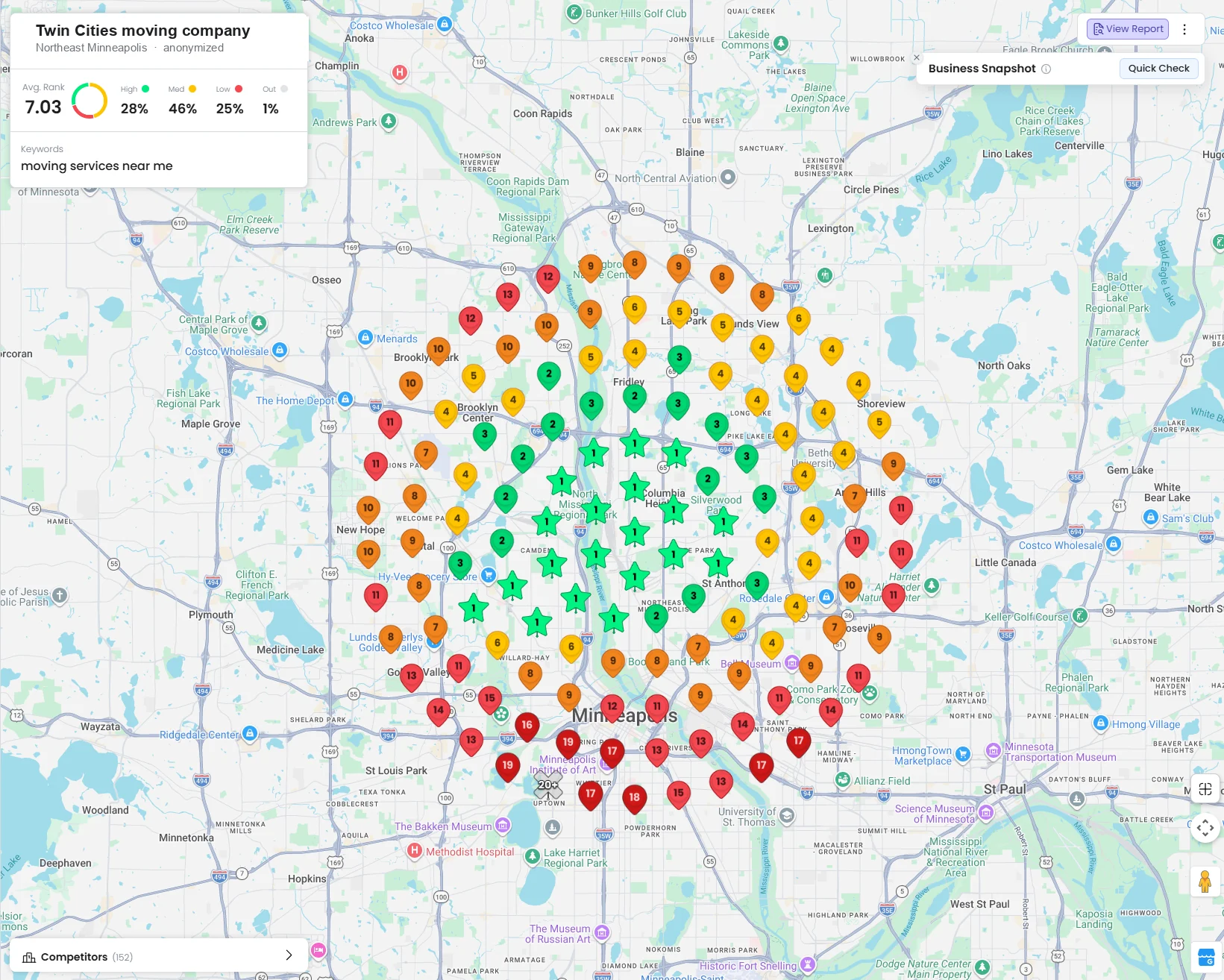
Look at what that shows. A tight cluster of green number-one results around their address in northeast Minneapolis, ringed by twos and threes, then yellows, then oranges, and by the time you reach downtown Minneapolis, Uptown and the outer suburbs it's red: 13, 17, 19, 20-plus. Average rank across the whole grid is 7.03. Twenty-eight percent of the map is a high ranking. Twenty-five percent is low. There are 152 competitors in that market.
That business ranks number one and it ranks twentieth, for the same keyword, on the same day. Both are true. Which one you see depends entirely on where you're standing when you search.
This is why a rank-tracking report showing a single number for a local keyword is close to meaningless, and why "we got you to number one" deserves the follow-up question: number one where?
What a dominant grid actually looks like
For contrast, here's a bankruptcy practice we work with in Dayton, Ohio, scanned for "bankruptcy attorney near me."
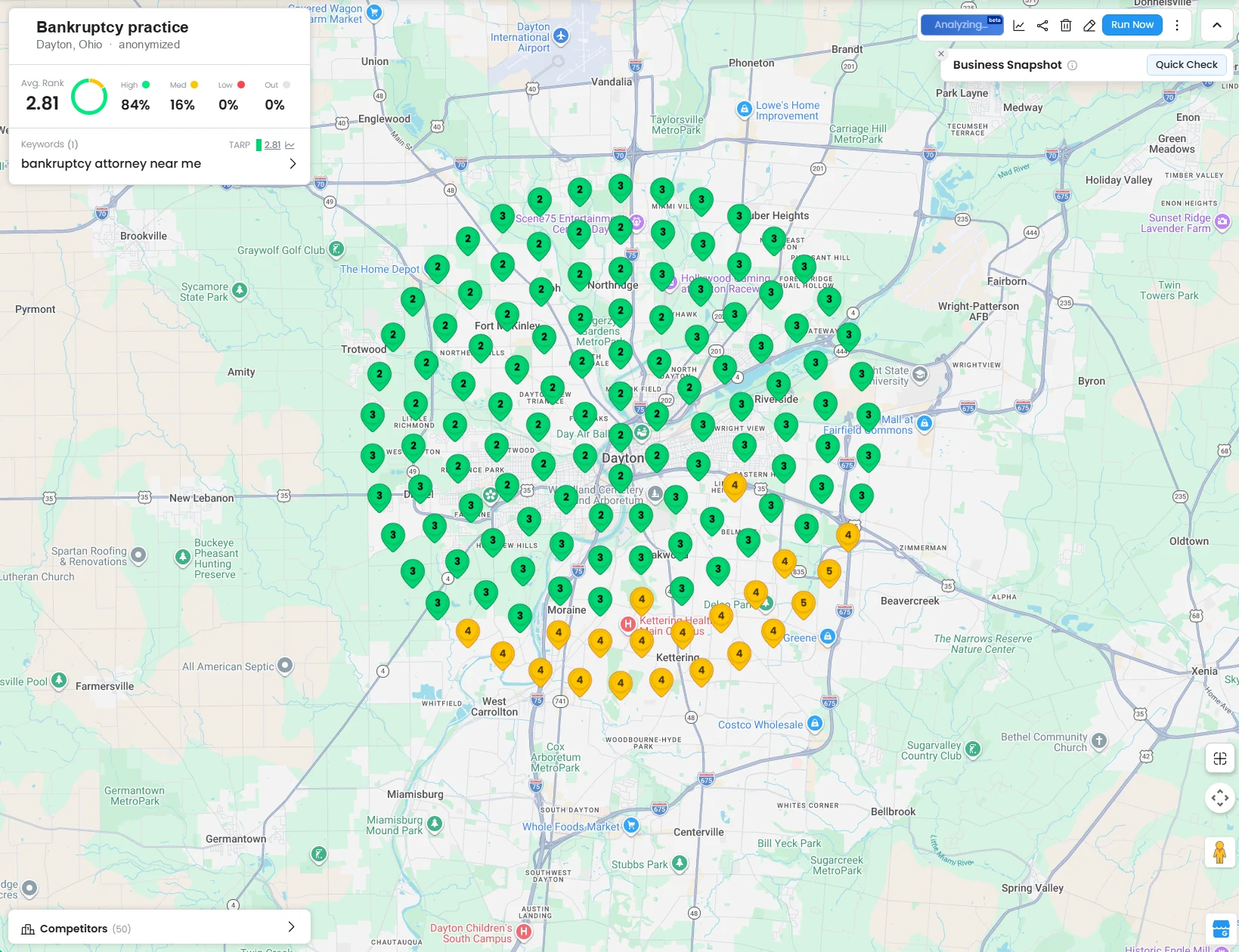
Average rank 2.81. Eighty-four percent of the grid is a high ranking, sixteen percent medium, and nothing at all in the low or out-of-results bands. The green runs edge to edge across the entire metro, with only a small band of fours and fives softening toward Kettering and Centerville in the south.
Unique InsightPut the two grids next to each other and the strategy writes itself. The goal is not a better number, it's a bigger green area. Proximity is the second-strongest ranking factor and you cannot move your building, so the work is everything else: the category, the name, the hours, the review volume and recency, the behavioral signals. Those are what stretch your green radius outward from the pin. A business with a wide green grid has earned enough relevance and prominence to overcome distance. A business with a tight green cluster and red edges is winning only where proximity is doing the work for it.
Which is also the honest way to read the first grid. That company is not underperforming. It is out-ranking 152 competitors and holding the top spot across a real chunk of the metro. But there is obvious room to the south and west, and now it's visible rather than hypothetical. That's the whole value of scanning: it turns "how are we doing" into a map with specific places on it.
Alongside the grid, your profile's own performance data is worth reading monthly. Calls, direction requests, website clicks, and the search terms people used to find you. Those numbers are both a report card and a ranking input, since they're exactly the behavioral signals Whitespark's panel scored.
One more surface to watch. 45% of consumers now use AI tools to find local businesses, up from 6% a year earlier, which makes AI the third-largest discovery channel behind Google and Facebook. The same profile data that feeds the local pack feeds those answers, so a well-structured profile is doing double duty.
Related: Whether AI assistants actually recommend your business
See where you actually rank across the metro, not just from your desk
We'll run a geo-grid scan of your main keyword across your service area and walk you through the map. $85/hr, no packages, no retainer, no twelve-month contract.
Tips and tricks most guides skip
Four things we do on every profile that almost nobody writes down. The first is the biggest time-saver in local listings and it is barely documented anywhere.
Personal ExperienceBuild the Google listing first, then let Bing copy it. This is the single biggest time-saver in local listings and most people set the two up separately, by hand, twice. Do Google first and get it verified. Then go to Bing Places for Business and sign in with the same Google account. Bing offers to import directly from your Google Business Profile: you grant permission, and it pulls your name, address, hours, phone, categories and photos across without you retyping any of it. Granting that access changes nothing on the Google side. Better still, you can schedule an ongoing sync, so when you update your hours or your phone number on Google, Bing follows automatically instead of quietly going stale. Expect the imported Bing listing to take a week or two to go live.
Why it matters beyond the saved hour: a stale Bing listing is a NAP mismatch sitting in public, and Bing data feeds Microsoft Copilot and other surfaces that are increasingly where people ask for local recommendations.
- Register and verify from your phone, on cellular data. Not from a desktop, and not on Wi-Fi. Google's video verification has to be recorded live from a mobile device anyway, and cellular reports your real latitude and longitude instead of a router's.
- On an iPhone, record the verification video inside the Google Maps app, not Chrome and not the Google app. The other two fail silently.
- Check your primary category against the top three results for your money keyword before you touch anything else. It is the single strongest ranking factor, and the obvious category is frequently the wrong one.
Frequently Asked Questions
How much does Google Business Profile optimization cost?
The profile itself is free, and the highest-impact fixes (primary category, map pin, hours, business name) cost nothing but an afternoon. Agencies typically bill this as a monthly retainer between $300 and $1,500. We bill it hourly at $85 with no package, because the honest answer is that the initial cleanup is a few hours of work and the ongoing part is mostly review generation, which belongs in your own workflow rather than an agency's.
Can I pay Google to rank higher on Maps?
No. Google states directly that "there's no way to request or pay for a better local ranking." Google Ads can place you in a paid slot above the local pack, and Local Services Ads can put you above that, but neither changes your organic local pack position. Anyone selling guaranteed placement is selling ads or selling nothing.
How long does it take to rank in the local pack?
Category and pin corrections can move things within days because they change your eligibility rather than your authority. Review-driven improvement runs on the pace of your review generation, and since 74% of consumers only weigh reviews from the last three months, that's roughly the horizon to plan against. Proximity you cannot change at all without moving.
How long does a Google Business Profile suspension last?
Google states that "appeal reviews and decisions can take up to 5 business days," though there is no phone number that reaches a human on this. In practice it depends on the trigger and on the quality of your documentation. A clean appeal with registration paperwork and address evidence moves faster than one contesting an address Google has already rejected. And some issues never fully resolve: our own suspension left behind a duplicate listing that Google has declined to remove across repeated attempts. Plan for the appeal to take real time, and for the outcome to be partial.
Should I set up my Google Business Profile on my phone or my computer?
Your phone, on cellular data, standing at the business address. Google requires video verification to be recorded and uploaded live from a mobile device, so a phone is mandatory at that step regardless. Doing the whole registration that way also means your location reports your actual latitude and longitude rather than a Wi-Fi router's position, which can resolve blocks away from your door.
Can I use a call tracking number on my Google Business Profile?
Your real local number needs to be on the profile and it needs to match your website exactly. Profiles support additional numbers, so the safe configuration is your real number as the primary and the tracking number as the additional. Many vendors recommend the reverse, tracking number first, and it's widely done, but Google's policy specifically warns against numbers that redirect users to a number other than the actual business. If you run tracking as your primary, you're accepting a documented policy risk.
Why do my Google reviews keep disappearing?
Google removed over 292 million policy-violating reviews in 2025, and its filters are applied per profile rather than uniformly. If a profile has previously shown signs of manipulation, bought reviews, review swaps, a burst of reviews from unrelated accounts, it gets verified more aggressively from then on, and genuine reviews get caught in the sweep. Reviews from accounts with no other activity, or from geographies far outside your service area, are the most likely to be filtered.
Do I need a physical address to rank on Google Maps?
You need a real, verifiable address, but you can hide it and operate as a service-area business. What you can't do is use a virtual office, a mailbox, or a coworking desk you don't actually staff. Those are among the most reliable suspension triggers. A home address you hide is legitimate; a rented mailbox is not.
Where to start
If you do this in order of measured weight rather than in the order the checklists present it, the first week looks like this:
- Verify your primary category against the top three local pack results for your money keyword
- Confirm your map pin sits on your actual door, and your address is correct and displayed (or properly hidden if you're a service-area business)
- Make sure your hours are accurate, including holidays, since being open at the time of search is the fifth-strongest factor
- Build a review request into the moment a job finishes, aiming for a steady trickle rather than a campaign
- Reply to every review, ideally the same day
- Only then worry about posts, photos, and your description
None of that requires an agency. If you'd rather not spend the afternoon, or you want to see the geo-grid before deciding, that's what we're here for.