
Open your single page application, right-click, and choose "View Page Source." If you mostly see an empty <div id="root"></div> and a stack of script tags, that's exactly what a search crawler sees first too. Your headline, your copy, your links: none of it is in the HTML yet. It only appears after the browser runs your JavaScript. The question is whether Google, and increasingly ChatGPT, ever wait around for that to happen.
Single page applications built in React, Vue, or Angular feel fast and app-like for users. But the way they deliver content can quietly hide it from the exact systems that send you traffic. Here's what actually breaks, why it happens, and how to fix it without throwing away your framework.
Key Takeaways
- A pure client-rendered SPA ships near-empty HTML. Google has to render it in a second pass, and that render can lag from seconds to hours (Vercel + MERJ, 2024).
- No major AI search crawler except Google's Gemini runs JavaScript at all. ChatGPT and Claude fetch your JS files and execute none of them (Vercel + MERJ, 2024).
- Server-side rendering (SSR), static generation (SSG), or prerendering put your content in the HTML up front, which Google explicitly recommends.
- You usually don't need to abandon React. You need to change where it renders.
What is a single page application, and why does SEO struggle with it?
A single page application loads one HTML shell, then uses JavaScript to swap content in and out without full page reloads. Google's own documentation confirms it processes these apps in three separate stages, crawling, rendering, then indexing, and that rendering is deferred, not instant (Google Search Central, JavaScript SEO Basics).
The trouble is timing. With traditional server-rendered pages, the full content arrives in the first HTML response. With client-side rendering (CSR), the first response is a skeleton. The real content shows up only after the crawler executes your bundle. So the SEO problem isn't React itself. It's that React renders in the browser, and crawlers don't all behave like browsers.
Think of it like a restaurant that mails out blank menus, then texts you the dishes ten minutes later. A patient diner waits. A rushed one orders nothing and leaves.
Do single page applications actually hurt SEO?
Yes, conditionally. Google can render JavaScript, but its own guidance is not to depend on it. As Google puts it, server-side or pre-rendering "is still a great idea because it makes your website faster for users and crawlers, and not all bots can run JavaScript" (Google Search Central). Rendering is best-effort, not a guarantee. On a pure client-rendered app, the HTML Google sees first carries almost no real content until the render queue catches up.
Personal ExperienceWhen we take over a client's client-rendered site, the pattern is familiar. Pages are in the sitemap, but Search Console shows them "Crawled, not indexed" for weeks. Internal links don't pass authority because they're built by JavaScript and aren't in the raw DOM. Product and service pages compete with a homepage that's the only thing crawlers reliably read. None of this means the framework was a mistake. It means the rendering strategy was.
Related: What Is SEO in 2026? The Definition Has Changed
How does Google really render your JavaScript?
Google renders in a queue, and that queue can run long. In a 2024 study of real Googlebot activity, Vercel and MERJ measured a median crawl-to-render delay of about 10 seconds, but the 90th percentile stretched to roughly three hours and the 99th to around 18 hours (Vercel + MERJ, 2024). Google's own stated median has long been about five seconds. Either way, your content waits.
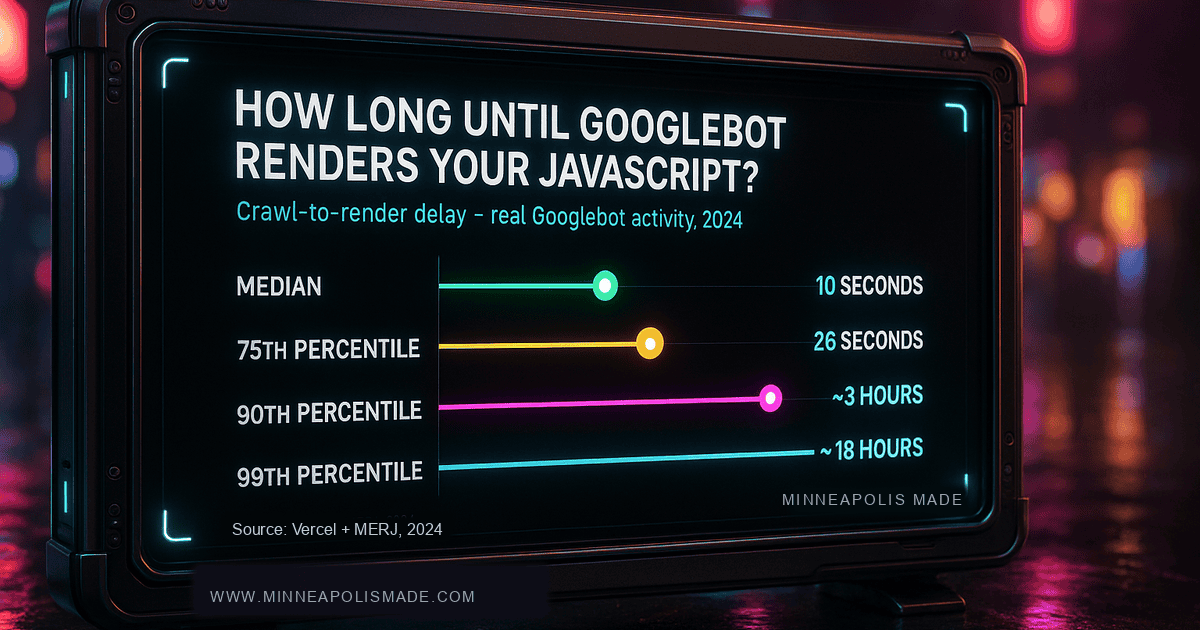
Why does the tail matter so much? Because for a new page, time-in-queue is time you're invisible. If you publish a launch page, a sale, or a fresh service page, the version Google indexes first is the empty shell. Server-rendered pages keep a slight edge in immediate link discovery, because their links exist in the HTML the moment they're crawled.
Why can't ChatGPT and Perplexity see your SPA?
Unique InsightHere's the part most "JavaScript SEO" guides still miss in 2026. AI search crawlers don't render JavaScript at all. In a December 2024 analysis, Vercel and MERJ found that GPTBot, ClaudeBot, PerplexityBot, and the rest fetch JavaScript files as text but execute zero percent of them. ChatGPT's crawler requested JS files in 11.5 percent of fetches and Claude's in 23.8 percent, yet neither ran a single line (Vercel + MERJ, 2024).
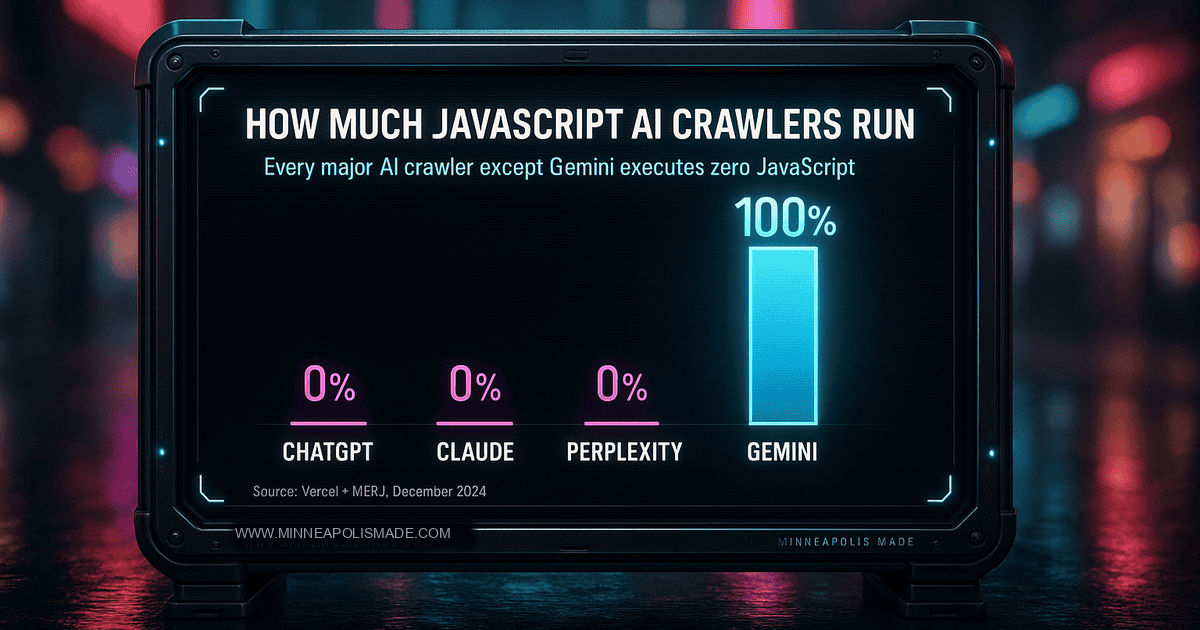
So if your content is client-rendered, every major AI engine except Google's Gemini sees a blank page where your answer should be. Gemini is the lone exception because it rides on Googlebot's rendering infrastructure. As more buyers ask ChatGPT and Perplexity for recommendations before they ever touch Google, a client-only SPA quietly removes you from the conversation. This is the same reason getting cited by AI depends on plain, crawlable HTML.
Related: The Markdown Myth: What Google Actually Said About llms.txt and AI SEO
Related: SEO vs AEO vs GEO: The 2026 Visibility Stack Explained
What does a heavy SPA do to your Core Web Vitals?
JavaScript is the single heaviest cost in most modern page loads, and it keeps growing. The 2024 HTTP Archive Web Almanac put the median JavaScript payload at 558 KB on mobile and 613 KB on desktop, up about 14 percent year over year, with roughly 44 percent of mobile JS going unused (HTTP Archive Web Almanac, 2024). All of it has to download, parse, and run before the page becomes interactive.
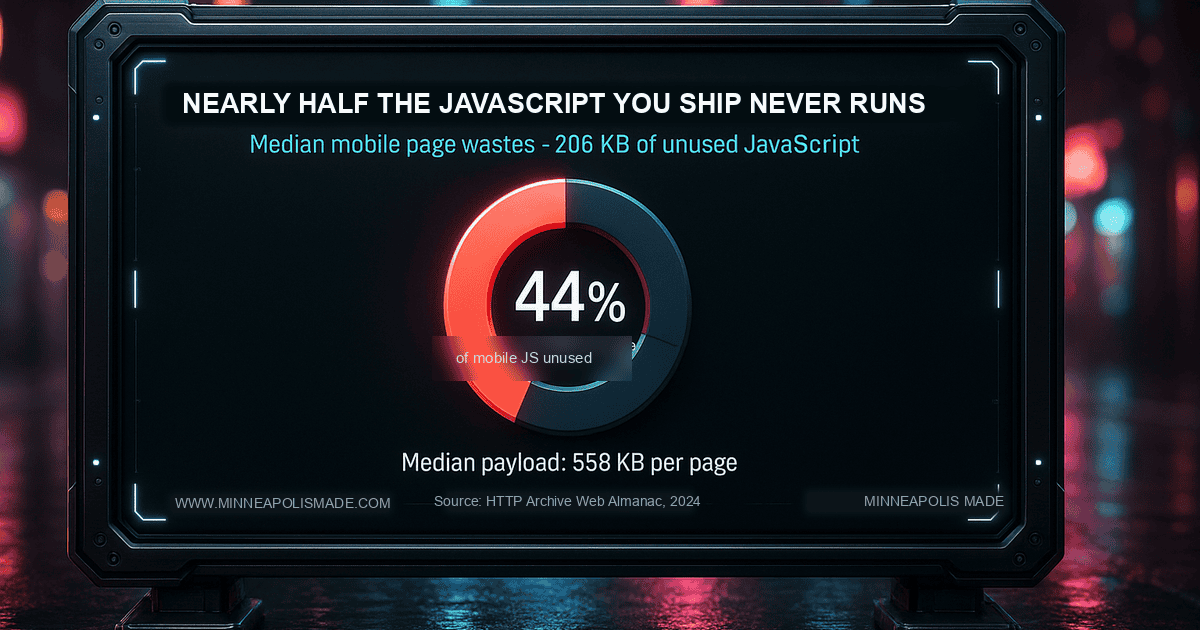
That weight lands directly on your Core Web Vitals. The same 2024 HTTP Archive Web Almanac dataset measured a median mobile Total Blocking Time of 1,208 milliseconds, with the 90th percentile near 5,950 milliseconds. Heavy hydration delays interactivity, pushes out Largest Contentful Paint, and frustrates the very users a fast SPA was supposed to delight. Shipping less JavaScript, and rendering more of it on the server, fixes both the speed problem and the indexing problem at once.
Related: Core Web Vitals Explained: What Minneapolis Business Owners Need to Know
Is your React or Vue site invisible to Google and ChatGPT?
We rebuild client-rendered apps on a server-rendered foundation that keeps the slick feel and puts your content back in the HTML, where crawlers and AI engines can read it. Billed hourly, no rebuild-from-scratch upsell.
How do you fix SPA SEO? The rendering options, compared
The fix is almost never "stop using JavaScript." It's choosing where your HTML gets built. Google states the goal plainly: server-side rendering or pre-rendering "makes your website faster for users and crawlers, and not all bots can run JavaScript" (Google Search Central). Here's how the main strategies stack up.
| Strategy | Where HTML is built | SEO + AI visibility | Best for |
|---|---|---|---|
| CSR (client-side) | In the user's browser | Empty first HTML, invisible to non-Gemini AI | Logged-in app dashboards, not public marketing pages |
| SSR (server-side) | On the server, per request | Full HTML on first load | Dynamic, frequently-changing content |
| SSG (static) | At build time | Strongest + fastest | Blogs, service pages, docs, marketing |
| ISR (incremental) | Build time, refreshed on a schedule | Scales to large sites | Big catalogs that change occasionally |
| Prerendering | Cached HTML snapshot for bots | Decent stopgap | Legacy SPAs you can't refactor yet |
Frameworks like Next.js, Nuxt, and Astro make this a configuration choice rather than a rewrite. Notably, Google itself treats the old "dynamic rendering" workaround, serving bots a separate prerendered copy, as a stopgap rather than a long-term fix. The durable answer is to render your real content on the server or at build time, so it is there on the first response. Same React, different render location.
Related: Why Headless WordPress Is the New Industry Standard
Your SPA SEO checklist
Once your content renders server-side, the rest is hygiene. These are the items we verify on every SPA we ship, and the ones we check first during an audit.
- Real links. Use genuine
<a href>tags, not click handlers on a<div>. Crawlers follow href attributes, not onClick events. - Per-route metadata. Each route needs its own unique title, meta description, and canonical tag, rendered into the HTML, not injected late by JavaScript.
- Correct status codes. A missing route must return a real 404 from the server. SPAs love to answer everything with 200, which creates soft-404s.
- Server-rendered structured data. Put JSON-LD in the initial HTML so it's there before any render pass.
- A real XML sitemap. List every indexable route so Google isn't relying on JavaScript-built navigation to find them.
- Lean bundles. Code-split, lazy-load below the fold, and cut the roughly 44 percent of JavaScript that typically ships unused.
- Test what crawlers see. Use the URL Inspection tool's rendered HTML and "view source," not just the browser, to confirm content is present.
Frequently Asked Questions
Is React bad for SEO?
No. React renders in the browser by default, which is the SEO problem, not React itself. Rendered server-side through Next.js or a similar framework, React pages ship full HTML and rank fine. Google recommends server-side rendering precisely because not all bots run JavaScript (Google Search Central).
Does Google index JavaScript content?
Usually, eventually. Google queues JS pages for a separate render pass with a median delay around 10 seconds that can reach hours at the 90th percentile (Vercel + MERJ, 2024). Google also warns it won't rely on rendering, so critical content should live in the initial HTML.
SSR or SSG, which is better for SEO?
Both put content in the HTML up front, so both are strong. Static generation (SSG) is fastest and ideal for pages that don't change every request, like blog posts and service pages. Server-side rendering (SSR) suits dynamic, frequently-updated content. Many sites mix both per route.
Will my single page application show up in ChatGPT and Perplexity?
Only if the content is in the HTML. AI crawlers like GPTBot and PerplexityBot execute zero JavaScript (Vercel + MERJ, 2024), so a client-rendered SPA is invisible to them. Server-side rendering or static generation makes your pages readable to AI search engines.
Do I have to rebuild my whole site to fix this?
Rarely. Most fixes are a rendering configuration change within your existing framework, not a ground-up rewrite. Prerendering can even serve as a stopgap for legacy SPAs. The goal is moving where the HTML is built, not replacing your stack.
The bottom line on single page application SEO
SPAs aren't an SEO dead end. They're an SEO decision. Client-side rendering hands crawlers an empty page and hands AI engines nothing at all, while server-side rendering and static generation give both a complete page on first load. In 2026, with Google queuing renders for hours and ChatGPT running none of your JavaScript, the safest place to build your HTML is on the server.
If you're not sure what crawlers actually see when they hit your site, that's the first thing worth checking, because the gap between "looks great in my browser" and "indexed and cited" is exactly where rankings and AI mentions leak away.
Build it once, build it to rank.
We build custom web apps and headless sites in React and Next.js that stay fast for users and fully readable to Google and AI search. Senior-led, hourly, no packages.