TL;DR
WordPress development drifted into template pushing: agencies stacking premium themes, page builders, and 30+ plugins on top of a CMS that was built to publish blog posts. It looked efficient at the time. The bill came due as bloated sites, hacked sites, slow LCPs, and Core Web Vitals scores that quietly throttle search visibility.
Full-fledged WordPress sites are a thing of the past. Building today with a headless CMS saves real time and money, ships pages that load in under 2 seconds, and is fundamentally more secure. This is how WordPress was supposed to be used from the start: as a content wrapper for the blog, not as the entire website.
Some background
Christopher Merry has been working in WordPress since 2003, the year it launched. Before that, he was building sites in Joomla, .NET, and custom hand-coded HTML and PHP. He has cycled through twenty different boilerplate frameworks, grid systems, and starter kits. He has shipped on Drupal, Magento, WooCommerce, and pretty much every CMS under the sun. He even did a little Concrete5 for a stretch in there. So when he tells you headless WordPress is the way to build sites in 2026, that is coming from the other side of the gauntlet.
There is a good way to use WordPress, and it’s as a wrapper for your blog. Used that way, WordPress stays secure, lean, and fast. The rest of the site, the pages, the calculators, the marketing UX, has no limitations, because you’re not writing around WordPress. WordPress is just the thing you bring in for the part it’s actually good at.
WordPress powers 42.2% of all websites and 59.6% of the CMS market according to W3Techs (May 2026). It is the most successful piece of open-source software ever shipped to the web. And yet, most of what gets called “WordPress development” today is the wrong way to use it.
WordPress was built in 2003 to publish blog posts. It is still excellent at that. The trouble starts when teams keep stacking page builders, calculator plugins, form integrations, e-commerce extensions, and bespoke landing-page UX onto the same engine that was designed to publish a 1,000-word article into a database. The result is the slow, brittle, plugin-soup site that every digital agency in town spends half their retainer keeping alive.
There is a better answer, and it is becoming the new default. Headless WordPress.
Key Takeaways
- WordPress runs 42.2% of all websites and 59.6% of the CMS market as of May 2026 (W3Techs), but its blog-first architecture buckles when stretched onto custom pages, calculators, and conversion-critical UX.
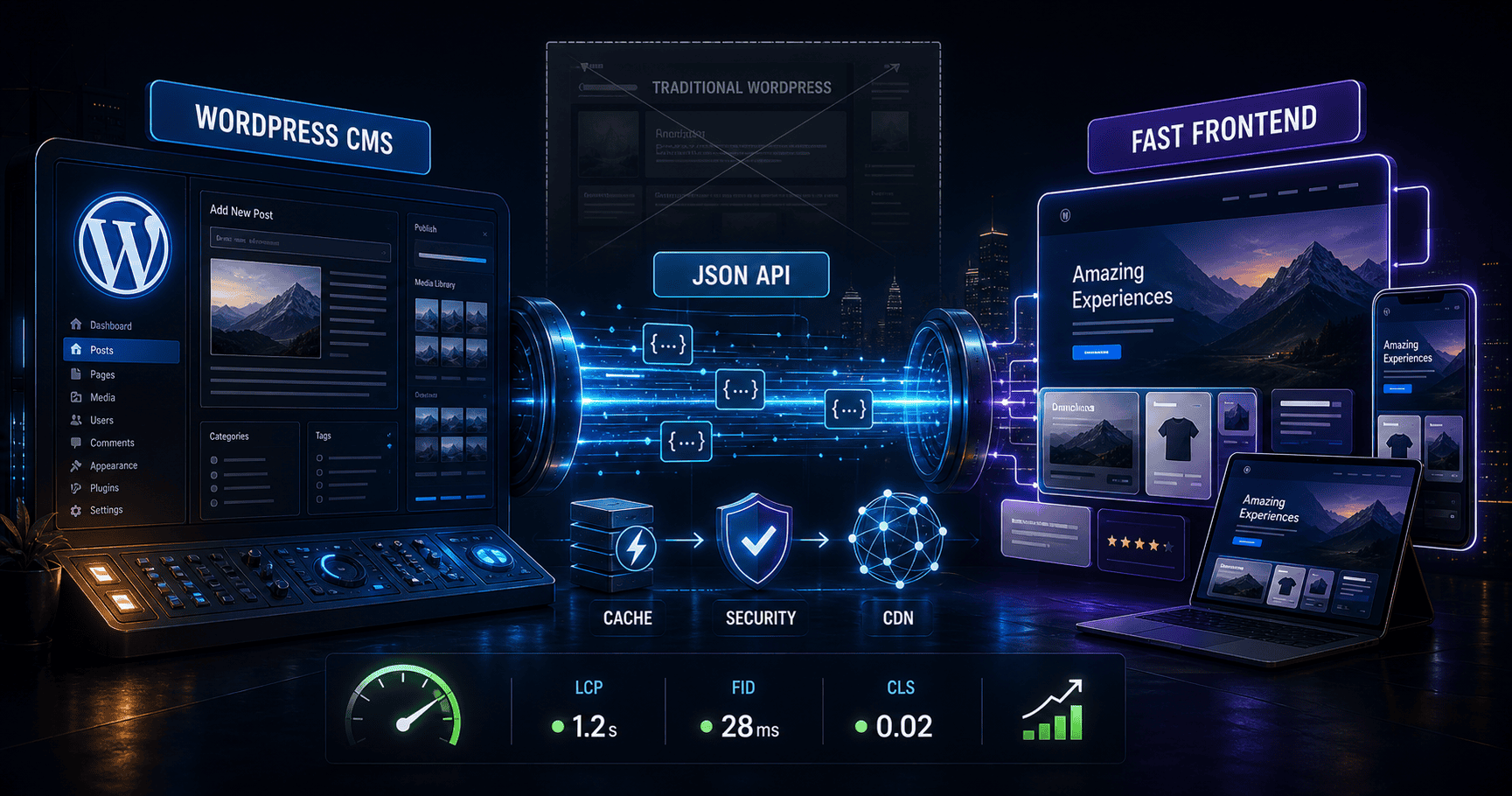
- Headless WordPress separates the CMS (WordPress as a content API) from the frontend (a static or framework-rendered site that talks to it). The pages get faster; the content authoring stays familiar.
- The market is moving in this direction fast: Future Market Insights projects the headless CMS software industry to grow at a 22.6% CAGR through 2036 (FMI, 2025).
- Pages loading in 1 second convert at roughly 3x the rate of pages loading in 5 seconds (Portent). Headless architecture is the most direct lever for getting there.
- AI-assisted development has compressed the timeline. A custom headless frontend that used to take weeks now ships in days, which removes the historical reason teams settled for plugin-built page builders.
WordPress Was Built for Blogs. So Use It for Blogs.
WordPress shipped in 2003 as a fork of b2/cafelog, a blogging tool. According to W3Techs, it now runs 42.2% of all websites and 59.6% of CMS-driven sites as of May 2026. That dominance makes it tempting to treat WordPress as the answer for any web project. It isn’t.
The original architecture is simple and beautiful. Posts live in a database. Themes render those posts. The editor is structured around the model of “an author writes an article, hits publish, the world reads it.” Twenty years later, that loop is still the cleanest content workflow shipping in any CMS. There is no good reason to leave it.
Personal Experience
The Minneapolis Made site you are reading this on uses WordPress for exactly that purpose, and nothing else. Every blog post, including this one, is authored in the WordPress editor, sits in the WordPress database, is exposed through the WordPress REST API, and gets pulled into the static frontend as JSON with a 5-minute cache. The editorial team writes in WordPress. Visitor requests never boot it.
Honestly, we could skip WordPress entirely and store blog content in flat markdown files or a custom database. The only reason we keep WordPress in the loop at all is portability for the client. If you ever decide to leave us, you walk away with a fully exportable WordPress install that any developer in the world can pick up and continue. We don’t believe in technical lock-in. WordPress is the most universally understood CMS on the planet, so leaving it in place even when we don’t strictly need it is the right move for the client, not the agency.
The trouble starts when WordPress is asked to do everything else. Page builders for landing pages. Plugins for calculators and forms. Theme overrides for pricing tables. Integration glue for CRMs, email, ad pixels, and analytics. Each addition is reasonable in isolation; in aggregate, they turn a publishing platform into a fragile, slow-rendering, plugin-soup application. After 25 years of building on WordPress, we have watched that compromise eat client engagement, page speed, and Core Web Vitals on every site that started life as “just WordPress.”
The industry’s mistake is treating WordPress as a website framework. It was always a publishing tool. Letting it do that one job, and giving the rest of the site to a different layer, is the move.
Related: our custom web development page walks the same trade-off in more depth, including a 4-card decision matrix for agency vs hybrid vs freelancer vs template builder. For a deeper look at the security failure modes plugin-stacked WordPress sites tend to run into, see the most common WordPress security mistakes.
What Is Headless WordPress, and Why Is the Industry Moving There?
The global headless CMS software market is projected to grow at a 22.6% compound annual growth rate from 2026 to 2036, per Future Market Insights (2025). That is faster than the CMS market overall and faster than most software categories. The reason is straightforward. Headless solves the architectural problem traditional WordPress can’t.
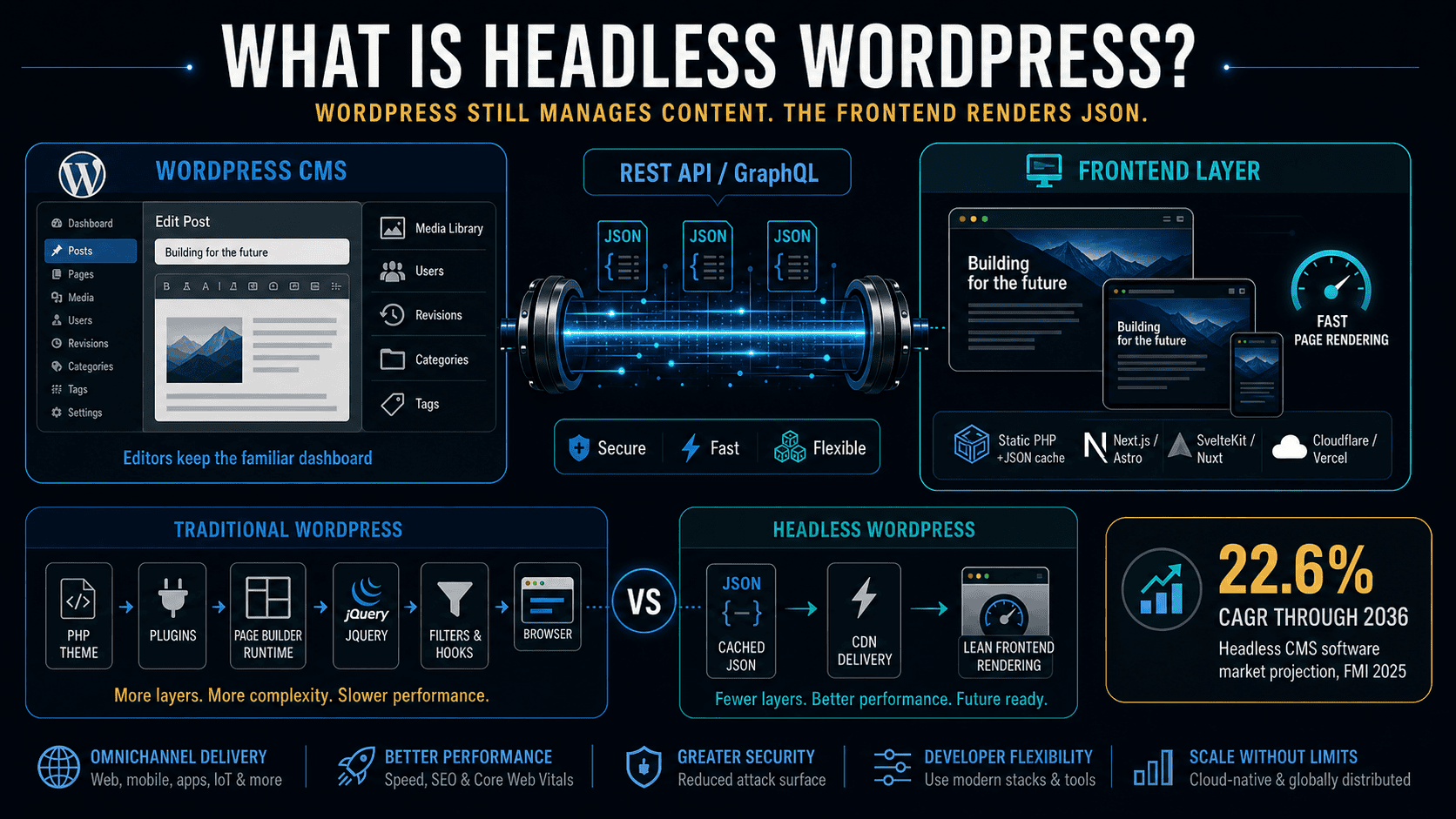
Headless WordPress means decoupling the content management layer (where editors write) from the rendering layer (what visitors see). WordPress is still WordPress. The dashboard, the editor, the user permissions, the media library, the post revisions, the categories, the tags. None of that changes for the writer. What changes is how that content reaches the browser.
Instead of WordPress generating the HTML on every request through PHP themes and plugin filters, headless WordPress publishes content as JSON through the REST API or GraphQL. A separate frontend pulls that JSON, caches it, and renders the page. That frontend can be:
- Static PHP with a JSON cache layer, the way this site is built
- Next.js or Astro with incremental static regeneration
- SvelteKit or Nuxt for app-like UX
- A pre-rendered static site deployed to Cloudflare Pages or Vercel
The benefit is that the frontend is no longer a WordPress theme. It does not have to load WordPress core, the plugins, the page-builder runtime, the jQuery shim, the Heartbeat polling. It just has to render JSON. And rendering JSON is fast.
Unique Insight
Most of the WordPress development industry has spent a decade arguing about which page builder is least bad. Elementor, Divi, Beaver Builder, Bricks, Oxygen, Gutenberg blocks. That argument was always about which paint to put on a fundamentally heavy chassis. Headless is the alternative most agencies have been quietly aware of and slow to adopt, because it required custom frontend skill they did not staff for. AI-assisted development changed that math.
The shift isn’t theoretical. Major brands have already moved: Smashing Magazine, TechCrunch’s Japanese edition, NASA’s blog properties, and a growing list of e-commerce shops that ran into Shopify’s frontend constraints. The pattern repeats. The team likes WordPress’s editorial model. They cannot tolerate the frontend’s weight. They go headless.
Related: our WordPress development service page covers when WordPress is the right call and when it isn’t.
How Does Headless WordPress Improve Site Speed and Core Web Vitals?
Pages that load in 1 second convert at roughly 39%; the rate drops to 34% at 2 seconds and 29% at 3 seconds, per Portent’s site speed and conversion rate study. A B2B lead generation site that loads in 1 second has a conversion rate 3x higher than one that loads in 5 seconds. Headless WordPress is the most direct lever for closing the gap between “decent” load times and the sub-second range that actually moves business metrics.
The why is mechanical. Traditional WordPress renders every page request through PHP. The request hits Apache or LiteSpeed, which spawns PHP, which boots WordPress, which loads every active plugin (often 25 to 50 of them), runs the entire init lifecycle, queries the database, fires action hooks, runs theme filters, builds the HTML, and sends it down the wire. Every plugin in the stack adds milliseconds.
Headless WordPress skips all of that on the user request. The frontend serves a pre-rendered or cached page directly. WordPress only runs when an editor publishes new content, which is once a week, not every visitor.
Original Data
This site is the cleanest example we can show you. The Minneapolis Made frontend is custom static PHP. Blog content is pulled from headless WordPress via the REST API and cached as JSON for 5 minutes. The result is a 98 mobile Lighthouse score, a 2.2-second LCP, and a #1 ranking against 21 Twin Cities web design and SEO agencies in our 2026 web design speed report. The closest competitor’s mobile Lighthouse score lagged by double digits. None of that is achievable on a vanilla WordPress install with the same plugin footprint a typical marketing site needs.
There is a second-order effect that matters more than the real cost of a slow website in lost conversions. Google’s Page Experience signals (LCP, INP, CLS) are now ranking factors, and they are gated on what the user actually experiences. A WordPress site that scores 60 on mobile Lighthouse is not just slow for users; it is being penalized in search visibility. Headless architecture moves those scores from yellow to green more reliably than any individual optimization at the WordPress layer.
Related: our 2026 Minneapolis web design speed report benchmarks 21 Twin Cities agencies on the same Core Web Vitals metrics that Google ranks on.
Curious whether headless is the right call for your site?
Tell us your current stack, your traffic, and your roadmap. We will give you a no-pitch read on whether headless WordPress would actually move your numbers, or if a tighter traditional WordPress build is the better answer.
AI-Assisted Development Makes Headless Faster Than Ever to Build
Custom frontend code used to be the bottleneck. The reason WordPress page builders won the agency market was not that they produced good output; it was that they let a non-coder ship a marketing page in an afternoon. Building the same site the old-fashioned way, with hand-written code in a real framework, was a multi-week engagement at minimum, and a fancy custom marketing site could run hundreds or even thousands of developer hours.
That math has flipped. Pair an AI coding tool (Claude Code, OpenAI Codex, Cursor, Copilot, or any of the half-dozen serious options that have shipped in the last 18 months) with a modern framework (Astro, Next.js, SvelteKit, or even a hand-rolled static PHP layer like ours) and a senior developer can prototype, build, and ship a custom marketing site in roughly a week. A landing page that used to take three to five days now ships in one. A bespoke calculator that would have been a two-week build with custom plugins is now a one-day component in a headless frontend.
That speed-up is exactly why the only thing we still use WordPress for is the blog. Pages, landing pages, calculators, integrations, the entire site shell, all of it is faster to build the old-fashioned way now than it is to wrestle into Elementor or Divi. The page-builder convenience that used to justify the WordPress-everywhere architecture isn’t a real time savings anymore.

Unique Insight
The historical case for traditional WordPress over headless was always developer productivity, not output quality. Page builders were faster than custom code, even though they produced slower, heavier, less-flexible pages. AI-assisted development collapsed that productivity gap. Custom is now as fast to build as page-builder, and it ships sites that load in under 2 seconds with proper Core Web Vitals out of the box. The agencies still selling Elementor builds in 2026 are doing it because they haven’t updated their delivery model, not because the alternative is too expensive.
For our own work, projects that used to scope at 80 to 120 hours now scope at 30 to 60 hours. The principal still leads design and code on every project, and the small studio team handles content production and ongoing care, so quality and continuity stay constant. The hours just compress, and clients get better sites for less money.
Related: our breakdown of Minneapolis web design costs covers the dollar math behind custom vs page-builder builds in detail.
When Should You Actually Use Headless WordPress?
Headless WordPress is the right architecture for businesses where pages drive revenue and where the content team wants to keep editing in WordPress. It is not the right architecture for every site. After 25 years and 500+ WordPress projects across the Twin Cities, here is how we route the call. If you are weighing headless WordPress against Sanity, Contentful, or another headless platform, that comparison lays out the trade-offs.
Headless is the right call when:
- Page speed is a competitive lever. E-commerce (including WooCommerce), lead generation, comparison-shopping intent, mobile-heavy traffic.
- You need custom UX. Calculators, configurators, interactive tools, bespoke landing pages, A/B test infrastructure that isn’t strangled by plugins.
- You want to keep the editorial workflow. Your team likes WordPress and has trained on it; you don’t need to migrate the writers, just the renderer.
- You have a developer relationship for ongoing work. Headless removes the page-builder dependency, but it does add a custom frontend that needs the same kind of senior maintenance every custom system does.
- You care about Core Web Vitals as a ranking signal. The Page Experience update has been a Google ranking factor since 2021, and the algorithm has grown more aggressive about penalizing slow sites since.
Stay traditional WordPress when:
- Your site is mostly editorial. A blog, a newsroom, a thought-leadership content brand. The frontend speed gap matters less when the conversion event is a newsletter signup, not an e-commerce checkout.
- The owner edits everything personally and isn’t going to retain a developer relationship. WordPress with a clean theme and 5 plugins is more maintainable for a non-technical solo than a custom headless frontend.
- The budget genuinely cannot support custom frontend work. Even with AI-assisted speedup, headless costs more upfront than installing a theme. For sub-$5K marketing sites, traditional WordPress is the right fit.
The mistake we see most often is the third bucket buying their way into the first one anyway, ending up with an Elementor-built marketing site loaded with 40 plugins, scoring 35 on mobile Lighthouse, and losing leads to faster competitors without ever knowing why. The right call is to know which bucket you are in and build accordingly.
Related: our complete Minneapolis web design guide walks through the same architectural decision for non-technical owners.
Already on WordPress? We can rebuild it headless. Same site, up to 90% faster.
Same design. Same content. Same WordPress dashboard for your editors. Rebuilt as a custom static frontend that pulls from WordPress over the REST API, with caching, image optimization, and Core Web Vitals dialed in. The visual identity stays. The performance transforms. Most migrations ship in 2 to 4 weeks at $85/hr, weekly invoices, no retainer lock-in.
Considering a headless WordPress build in Minneapolis?
WordPress + Next.js for the speed of static + the editorial freedom of WP. We have shipped headless builds for Twin Cities clients and we can scope yours.
Frequently Asked Questions
Is headless WordPress harder for content editors to use?
No, the editor experience is identical to traditional WordPress. Editors write in the same Gutenberg interface, manage the same media library, and assign the same categories and tags. The only difference is invisible to them: where the published content gets rendered. The frontend is what changes; the editorial workflow stays exactly the same.
How much faster is a headless WordPress site than a traditional one?
The realistic gap is large. A traditional WordPress site with a typical marketing-plugin stack often scores in the 40 to 60 range on mobile Lighthouse. A properly built headless WordPress site comfortably scores 90+ on mobile, with LCP under 2.5 seconds. We benchmarked our own site at 98 mobile Lighthouse and 2.2-second LCP against 21 Twin Cities agencies in 2026.
Does headless WordPress hurt SEO?
The opposite. Google’s Core Web Vitals ranking signals reward sites that score well on LCP, INP, and CLS, all three of which improve substantially under headless architecture. As long as the headless frontend is server-rendered or pre-rendered, the SEO outcome is meaningfully better than traditional WordPress. The risk to avoid is shipping a single-page application that requires JavaScript to render content, which Googlebot handles inconsistently.
Can I switch my existing WordPress site to headless without losing content or SEO?
Yes, with proper migration planning. The content stays in the same WordPress database; only the rendering layer changes. URL structures, schema markup, sitemaps, and 301 redirects are all preserved or improved. The risk is in the frontend implementation, not the migration itself. We have done this on enough WordPress sites to know the redirect-mapping and indexation-QA discipline that prevents ranking loss during the cutover.
Can you build a headless WooCommerce or e-commerce site on WordPress?
Yes. WooCommerce exposes products, categories, cart, and checkout through the WordPress REST API, so a headless frontend can render the entire storefront while WooCommerce handles inventory, orders, payments, and tax. The same speed and design-freedom benefits apply: a headless WooCommerce store loads faster than a traditional WooCommerce theme and gives you Shopify-quality custom UX without the platform lock-in. We cover the trade-off in more detail in our WooCommerce vs Shopify comparison for Minneapolis businesses.
What does headless WordPress development cost compared to traditional WordPress?
At our $85/hr billing, a typical headless marketing site rebuild lands in the 60 to 120 hour range, depending on page count and custom UX. Traditional WordPress with a premium theme and 30 plugins might come in 30% lower upfront, but the ongoing maintenance, plugin licenses, and performance debt usually erase that savings within 18 months. For sites where pages drive revenue, headless is almost always the better total-cost-of-ownership call.
The Architecture the Industry Is Going to Land On
WordPress isn’t going anywhere. It runs nearly half the web for a reason, and the editorial model it pioneered in 2003 is still the cleanest publishing workflow shipping in any CMS. The mistake is treating “use WordPress” and “build a website on top of the WordPress rendering engine” as the same decision. They are not.
The studios shipping sites that consistently rank, convert, and load fast are running headless. They keep WordPress for what it was built for, and they put a custom frontend in front of it for everything else. That separation is the new default.
If you are running a slow WordPress marketing site in 2026 and you don’t know why your competitors are ranking above you, this is the answer most of the time. Headless WordPress isn’t a fad. It’s the architecture the rest of the industry is going to land on within the next three years.
Keep reading: the complete Minneapolis web design guide, Minneapolis web design pricing, our WordPress development service page, our Minneapolis SEO services, or the custom-vs-WordPress decision matrix on the web development page.