
A Google Business Profile suspension does not announce itself. There is no phone call and no warning. Your listing simply stops appearing in the local pack and on Maps, and you find out because the calls stop or because you searched for your own business and it wasn't there.
This is a walkthrough of what actually happens next, written by a company that went through it. We were suspended, we appealed, and the outcome was only partly clean. That last part is the bit most guides leave out.
Read this first
Do not create a new profile for the same business while your appeal is open. Google says so explicitly, and doing it is one of the reliable ways to turn a fixable suspension into a duplicate listing you cannot get rid of. Ask us how we know.
Key Takeaways
- Google removed over 13 million fake Business Profiles and blocked 79 million inaccurate or unverified edits in 2025, which is the enforcement climate your appeal lands in (Google, 2026)
- Google's documented appeal path is: gather evidence, open the appeals tool, select the profile, submit, then attach supporting documents
- Google explicitly warns against creating a second profile for the same business while an appeal is pending
- Address changes, virtual offices, and name edits are the most common triggers
- Verification video must be recorded live from a mobile device and show signage, access, and proof that you manage the location
- Not every appeal ends cleanly. Ours left behind a duplicate listing Google has declined to remove
What does a suspended Google Business Profile look like?
It depends which kind you got, and the difference is enormous. Google's own documentation treats suspension and disabling as one event with one appeal path, but in practice there are distinct severity levels, and they are not equally survivable. Knowing which one you are looking at tells you how worried to be and how fast to move.
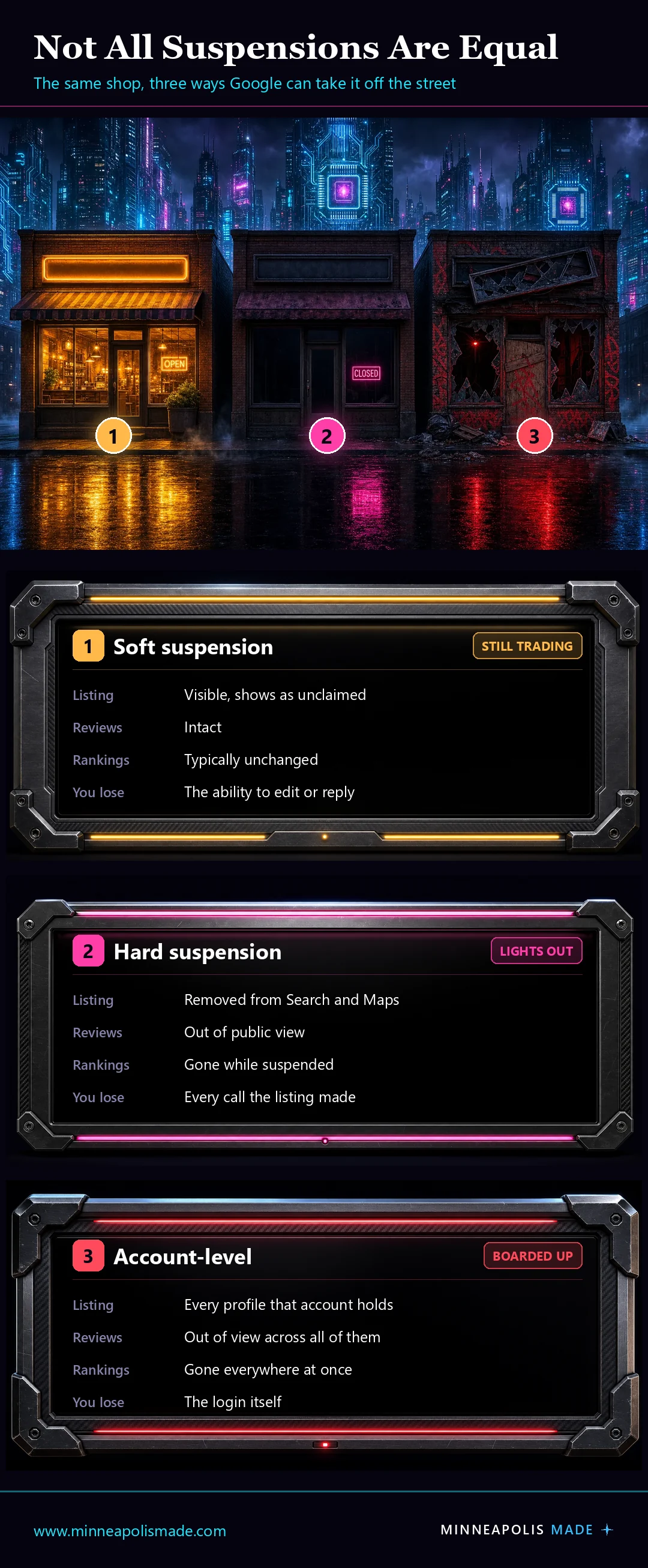
Level 1: soft suspension
The listing stays visible on Search and Maps. To the public it looks unclaimed rather than suspended, often showing a "Claim this business" link. What you lose is control: you cannot publish edits or manage the profile. Reviews stay put, and rankings typically do not move.
This is the survivable one. Your phone still rings while you sort it out.
Level 2: hard suspension
The listing is removed from Google Search and Maps entirely. It does not appear for any search, including someone typing your exact business name. Reviews and historical data go with it, out of public view and out of your reach. This is the one where the calls stop.
Level 3: account-level suspension
The rarest and the worst. When the Google account that manages the profiles is itself suspended, every listing that account touches goes down with it. A multi-location business can lose its entire footprint in one action, and the fix runs through account recovery before you can even start on the listings.
Is this just for spammers? Mostly in origin, not in effect. The triggers are the spam ones: keyword-stuffed names, duplicate listings, review manipulation, repeated suspensions for the same reason. But practitioners consistently report that Google associates profiles handled by the same account, so an agency or a multi-location operator can have clean listings caught by proximity to one bad one. A suspended Google account, including one suspended over a Google Ads issue, can take every Business Profile it manages with it.
Unique InsightThat association risk is the real argument for hygiene most people never hear. If you manage profiles for clients, or you have inherited access to listings you no longer work on, every one of them is attached to your account's reputation. Remove yourself from profiles you do not manage, do not accept access to a listing you suspect is spammy, and keep client work on accounts that are not also your personal Google account. The cost of getting this wrong is not one listing, it is all of them.
Unique InsightThe practical rule: soft suspensions are an administrative problem, hard suspensions are a revenue problem, and account-level suspensions are a business continuity problem. Each level is meaningfully harder to escape than the one below it, because each one gives you less to work with. A soft suspension still has a live listing you can point Google at. A hard suspension has nothing visible to verify against. An account suspension has no working login.
Whichever you have, the notice will rarely name the specific edit that triggered it. It tends to point at a guidelines page rather than a cause, which is why the first useful step is not appealing but reconstructing what changed.
Why do Google Business Profiles get suspended?
The triggers cluster around identity: who you say you are, and where you say you are. Sterling Sky's 2026 analysis puts the most common causes as excessive edits to profile details, no physical business presence at the stated address, a suspended manager or owner account, multiple listings for the same business, and operating in a spam-prone category such as locksmiths or garage door services. In our experience the order looks like this:
- An address change, or a home address used as a business address. Moving your registered address is the single most common trigger we see, and listing your house as your storefront is the version that catches the most owners out. A home address is legitimate for a service-area business, but only if you hide it and define service areas. Displayed as a storefront, it reads as no physical presence at the stated address.
- A virtual office, mailbox, or coworking desk you don't staff. Google tightened this hard once it worked out how many listings ran out of providers like Regus and DaVinci, and legitimate businesses in shared buildings got caught in the same net.
- A business name that doesn't match reality. Keywords appended to a name that isn't your registered one is the classic version.
- A service-area business that also displays a street address. Pick one.
- Categories that don't match what you actually do.
- Editing several sensitive fields at once. Changing name, address, and category in one sitting is a well-known way to draw a manual review.
The pattern underneath all of these is that Google is trying to answer one question: is this a real business, at this address, run by this person? Anything that makes that question harder to answer raises your risk. That is also why the fix is almost never an argument. It is documentation.
Why does everyone else seem to get away with it?
Personal ExperienceBecause enforcement is uneven, and the asymmetry runs in an unfair direction. Google's guidelines on business names apply to everybody. Policing does not. What we have watched happen repeatedly is that businesses running Google Ads get told, directly by their Google representative, that they cannot put keywords in their Business Profile name. Businesses that spend nothing have no representative, no conversation, and no one telling them to stop.
The result is that the advertiser, who is the one paying Google, follows the rule, while the competitor two miles away stuffs their profile title and outranks them for it. You get hit twice: once for the ad spend, and once for being the only party in the market actually being held to the naming policy.
We are not suggesting you break the rule. Keyword-stuffing a name you are not registered under is one of the more reliable ways to end up on this page. The point is the reverse: if you want the descriptive words legitimately, register the longer name so it becomes your real one, and report the competitors who did not. Both are documented, permitted routes, and both are slower than cheating and considerably safer.
How do you appeal a Google Business Profile suspension?
Google's documented process has five steps, and the first one is the one people skip. Gather your evidence before you open the tool, because Google states that "once you open the evidence form, you must submit it within 60 minutes or it won't be attached to your appeal."
- Prepare evidence. Google names official business registration, a business license, and utility bills for the business. Add signage photos and anything else tying the name and address to physical reality.
- Open the Google Business Profile appeals tool and confirm the Google account that manages the profile.
- Select the profile and read the violation notice attached to it.
- Submit the appeal.
- Attach your supporting documents. Google marks this optional. Treat it as mandatory.
Then wait. Google says "appeal reviews and decisions can take up to 5 business days," and you can check status in the appeals tool. There is no phone number that reaches a human on this, and chasing it through general support tends to produce a loop rather than an answer. Source: Google Business Profile Help.
Personal ExperienceThe single most useful thing we can tell you about the appeal is what to put in it. Do not explain. Do not argue that the suspension was unfair. Attach the registration paperwork, a utility bill at the address, and a photo of the signage with your business name on it, and let the documents do the work. Every appeal that has gone well for us has been short and heavy on attachments. Every one that dragged has been long and heavy on reasoning.
What does Google's verification video need to show?
If your appeal routes into video verification, Google requires footage that is "recorded and uploaded from a mobile device through your Business Profile," at least 30 seconds long. Google is explicit that "you must capture the footage live as pre-recorded videos aren't allowed, and you can't record it offline and upload it later." In practice, aim for 30 to 40 seconds. Longer videos do not help you. Source: Google Business Profile Help.
Personal ExperienceA platform trap worth knowing before you start: on an iPhone, record the video inside the Google Maps app. Not Chrome, and not the Google app. Through the other two the flow breaks down and you cannot reach the buttons you need, with no error message explaining why. It reads as a bug in your phone rather than the wrong entry point.
Shoot it in this order, without stopping the recording:
- Start outside the building. Capture the street and the cross streets so the location is placeable in the real world.
- Show the entrance, and unlock it on camera. If the building is locked, show that it's locked, then use your key or fob to unlock it and walk into the lobby. Do not let someone buzz you in and do not follow another person through. The point is that you can get in on your own.
- Find yourself on the directory. In a larger office building, film your business on the directory board. Anywhere else, film your permanent signage. The name has to match your profile exactly.
- Prove you have access. Before you record, make sure your own door is locked. Then on camera, pull the handle to show it's locked, put the key in, turn it, and go in. That sequence is the proof of management, and it's the part people most often skip.
Keep your signage visible as you move, and keep moving. Outside, to cross streets, to lobby, to directory, to locked door, to key, to inside, in roughly half a minute.
Related: The full Google Business Profile optimization checklist, ranked by what actually moves rankings
Suspended and not sure what triggered it?
We'll audit the profile against the documented triggers, tell you what we think caused it, and assemble the evidence pack for your appeal. $85/hr, no packages.
What happened when we got suspended?
Original DataHere is our own, and it is not a tidy story with a happy ending. We re-registered the profile at an apartment address. Google did not like that, and the profile was hard suspended. We then went to register at the Lumber Exchange Building in downtown Minneapolis, where the office actually is, and confusion followed. The result today is two listings, and Google will not remove the one that shouldn't exist. We have tried repeatedly.
We publish that because most guides on this topic end with "file an appeal and you'll be fine." Sometimes you are. Sometimes you end up with a duplicate you cannot kill, a support process with no human on the other end, and no explanation. Registering a business with Google is not always cut and dry, and anyone telling you it's a fifteen-minute task hasn't been through a bad one.
Unique InsightThe lesson we would pass on: treat every address change as a high-risk event, not an admin task. Get the new address verifiable first, with signage up and a utility bill in the business name, and only then change it on the profile. Changing the address and hoping the paperwork catches up is how a routine move turns into a suspension.
Related: What to do about a bad Google review, and when Google will actually remove one
What does Google actually check, and how is Apple different?
What the review looks at is physical and mundane. Signage, with your business name on a permanent fixture like a signboard, wall, or window, and that name matching your profile exactly, which is also where a keyword-stuffed title gets caught. Whether anyone is actually there. How easy the business is to access. And proof of management, meaning something only a person who works there could do.
Personal ExperienceGoogle does all of that remotely, through video. Apple does not. Apple sends an actual person to your door. Ours showed up while I was in a meeting with a client. I only knew because I saw them on the building cameras. We're in a secured building in downtown Minneapolis, which means a stranger cannot simply walk up to the office, and the visit ended with our Apple Maps inclusion being denied.
If you're in a secured building, plan for that: be reachable at the listed number, make sure the directory and suite signage are correct, and expect that a locked lobby reads as "cannot verify" rather than "established business."
Related: How we approach SEO for Minneapolis businesses
How do you avoid a suspension in the first place?
Google removed over 13 million fake Business Profiles and blocked 79 million inaccurate or unverified edits in 2025, per Google's April 2026 Maps trust and safety update. That is the enforcement climate your profile lives in, and it is why prevention beats appeal by a wide margin.
- Change one sensitive field at a time, and leave weeks between name, address, and category edits.
- Use a real, staffed address. A home address you hide is legitimate. A rented mailbox is not.
- Keep the profile name identical to your registered name and to your signage.
- Register and verify from your phone, on cellular data, standing at the location. Video verification requires a mobile device anyway, and cellular reports your real coordinates rather than a router's.
- Keep the evidence pack ready before you need it: registration, utility bill, signage photos.
Related: How AI is changing local search in the Twin Cities
Frequently Asked Questions
How long does a Google Business Profile suspension last?
Google says appeal reviews and decisions "can take up to 5 business days." That is the review window, not a guarantee of resolution: a clean appeal with registration paperwork and address evidence moves faster than one contesting an address Google has already rejected. Plan for real time, and plan for the possibility that the outcome is partial: ours left a duplicate listing that has never been resolved.
Can I make a new Google Business Profile while my appeal is pending?
No. Google states directly: "Do not create a new Business Profile for the same business while your appeal is under review." Doing it is one of the more reliable ways to end up with duplicate listings, which are considerably harder to resolve than the original suspension.
Why was my profile suspended when I didn't change anything?
Suspensions are sometimes triggered by a review of the category or address rather than by an edit you made, and occasionally by a competitor reporting the listing. The notice rarely names the specific cause. Work through the documented triggers, address the one that most plausibly applies, and submit evidence rather than an explanation.
Do I need a physical address to have a Google Business Profile?
You need a real, verifiable address, but you can hide it and operate as a service-area business. What you cannot do is use a virtual office, a mailbox, or a coworking desk you don't actually staff. Those are among the most reliable suspension triggers.
Does a suspension hurt my rankings after reinstatement?
The profile generally returns to the local pack once reinstated, but any time spent suspended is time not accumulating the behavioral signals, reviews, and engagement that feed local ranking. The practical cost is the gap, not a lasting penalty.
Where to start
If you're suspended right now: stop editing the profile, do not create a second one, and spend the next hour gathering registration paperwork, a utility bill in the business name, and photos of your signage. Then open the appeals tool and submit those with as few words as possible.
Related: Run a free audit of your site
If you're not suspended: treat your next address or name change as the risky operation it is, and get the paperwork lined up before you touch the profile rather than after.