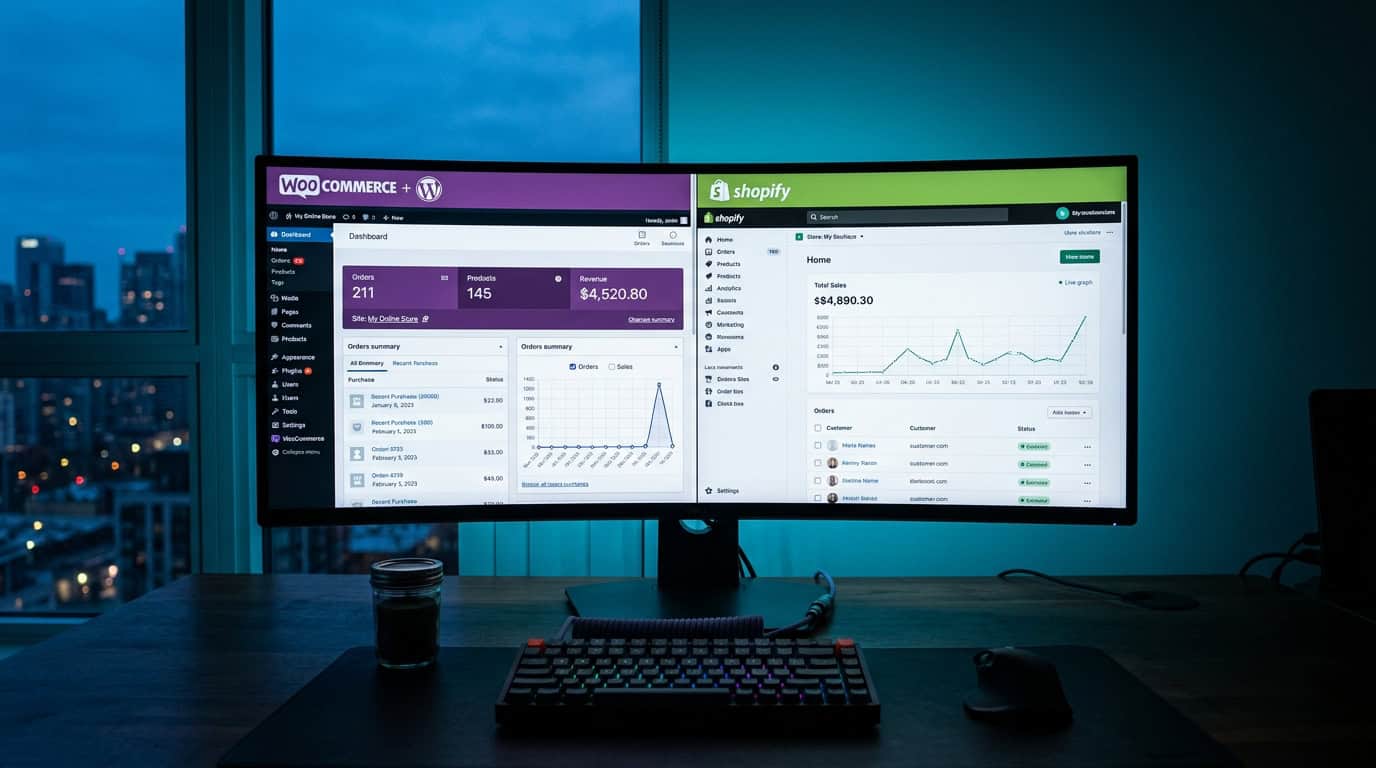
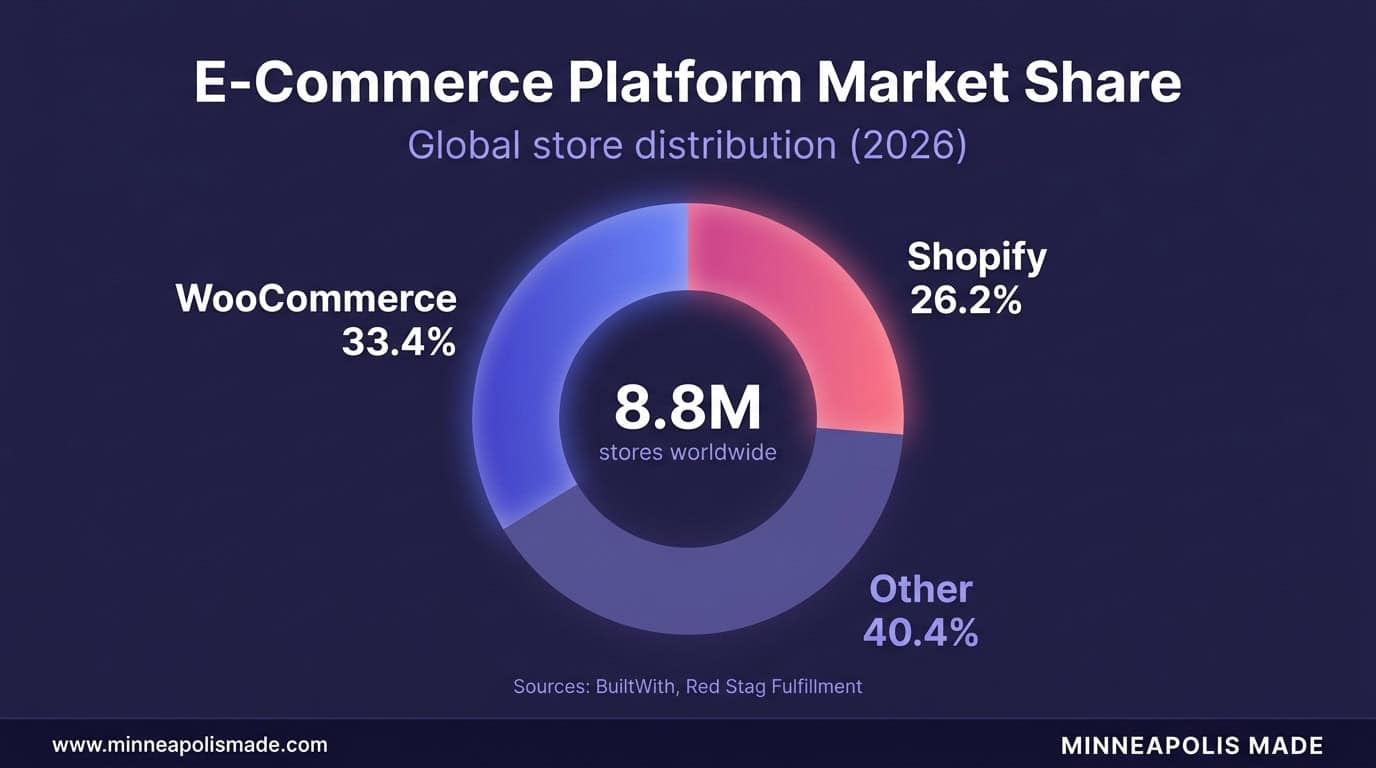
Every Minneapolis retailer launching an online store hits the same fork in the road: WooCommerce or Shopify? It’s not a trivial choice. According to StoreLeads data (2026), WooCommerce powers 4.53 million stores worldwide, holding 33.4% of the e-commerce platform market. Shopify isn’t far behind at 26.2%, with roughly 4.8 million active stores (Mobiloud, 2026). Both platforms work. Both have trade-offs. The right pick depends on your budget, technical comfort, and how you actually sell.
We’ve built dozens of stores on both platforms for Twin Cities retailers. What follows isn’t theory pulled from comparison articles. It’s what we’ve seen work, break, and cost real money in practice.
Key Takeaways
- Shopify costs $468-$4,788/year in subscriptions alone; WooCommerce runs $75-$920/year for small stores but climbs fast with managed hosting (Elementor, 2026)
- Platform choice matters less than optimization: top 20% of e-commerce stores convert at 3.2%+ regardless of platform (Blend Commerce, 2026)
- Minnesota’s destination-based sales tax adds real complexity that Shopify handles automatically but WooCommerce requires plugins to manage
- For Minneapolis brick-and-mortar retailers going online, Shopify’s built-in POS system is hard to beat. For complex product catalogs or custom integrations, WooCommerce gives you more control
How Do WooCommerce and Shopify Compare on Cost?
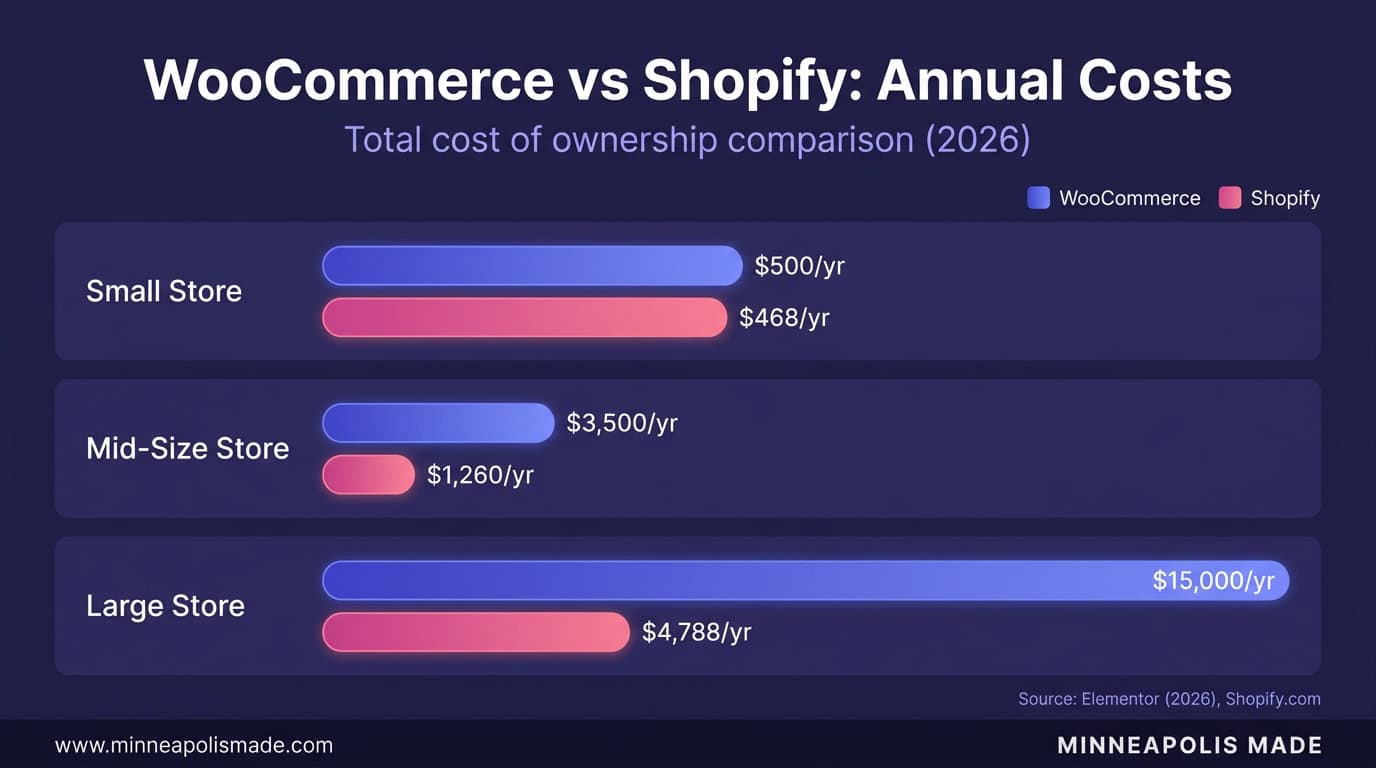
Shopify’s Basic plan costs $39 per month ($468/year), with the Grow plan at $105 and Advanced at $399 (Shopify.com, 2026). WooCommerce itself is free, but hosting, plugins, and maintenance add up. For a small store with under 50 products, Elementor’s 2026 pricing breakdown puts total cost at $75 to $920 per year. That’s comparable to Shopify Basic on the low end, cheaper on paper.
Here’s where it gets interesting. Mid-sized WooCommerce stores with custom plugins and managed hosting run $1,420 to $6,550 annually. Large stores needing advanced features, security hardening, and dedicated hosting? $6,450 to $30,700 per year. Suddenly WooCommerce isn’t the budget option anymore.
Then there are transaction fees. Shopify charges 2.9% plus 30 cents per transaction on the Basic plan, dropping to 2.4% plus 30 cents on Advanced. Use a third-party payment gateway instead of Shopify Payments, and they tack on an extra 2% (Basic), 1% (Grow), or 0.6% (Advanced). WooCommerce doesn’t charge transaction fees itself, but your payment processor will. Stripe and Square both charge 2.9% plus 30 cents, roughly matching Shopify’s Basic rate.
Personal Experience
For Minneapolis retailers doing under $10,000 a month in online sales, the cost difference is minimal. Once you cross $50,000 monthly, the math shifts. Shopify’s percentage-based fees compound, while WooCommerce’s costs are more fixed. We’ve seen Twin Cities retailers save $3,000 to $8,000 annually by switching to WooCommerce at that volume, though they’re spending more on developer time to maintain it.

Which Platform Converts Better for Retailers?
The global average e-commerce conversion rate hit 2.5% in Q3 2025, up 0.4 percentage points year over year (Ringly, 2026). But averages hide the real story. Shopify’s overall average sits at just 1.4% because that figure includes thousands of abandoned side-project stores. Serious Shopify merchants running real traffic hit 2.5% to 3%, and the top 20% convert at 3.2% or higher (Blend Commerce, 2026).
WooCommerce doesn’t publish aggregate conversion data the same way, since it’s self-hosted and there’s no central dashboard. But the same benchmarks apply. A well-optimized WooCommerce store with fast hosting, clean UX, and smart checkout design converts just as well as Shopify. The platform isn’t the bottleneck. Your product pages, site speed, and checkout friction are.
One area where the platforms diverge: mobile. Desktop conversion averages 3.9% while mobile lags at 1.8%. Shopify’s mobile-first themes tend to perform well out of the box. WooCommerce themes vary wildly. We’ve seen Minneapolis retailers on WooCommerce lose significant mobile revenue simply because their theme wasn’t properly optimized. If you go WooCommerce, budget for mobile testing. (For more on why speed matters, see our guide on the real cost of a slow website.)
How Does Each Platform Handle Minnesota Sales Tax?
Minnesota uses destination-based sales tax, meaning the rate depends on where your customer is, not where your store operates. The state rate is 6.875%, but local taxes push some areas higher. Minneapolis adds 0.5% for a total of 7.375%. Hennepin County has its own transit surcharge. Miss these details and you’re either overcharging customers or underpaying the state. Neither ends well.
Shopify handles this automatically. Turn on US tax collection, and Shopify calculates the correct rate for every Minnesota zip code, including local surcharges. It updates when rates change. For a retailer who just wants to sell products without becoming a tax specialist, this is a genuine advantage.
WooCommerce needs help. The default tax settings let you set a flat state rate, but they won’t automatically calculate city and county taxes. You’ll need a plugin like TaxJar ($19+/month), Avalara, or WooCommerce Tax (free but limited). TaxJar and Avalara handle destination-based calculations correctly for Minnesota, including the Minneapolis and St. Paul special taxing districts.
For Twin Cities retailers selling across Minnesota, this matters. You can’t just set “6.875%” and forget it. A customer in Duluth pays a different rate than one in Bloomington. Shopify solves this by default. WooCommerce requires either a paid plugin or manual tax table maintenance. If local search visibility matters to your retail business, pair your platform choice with a strong Google Business Profile strategy. Original Data
We’ve cleaned up tax compliance issues for several Minneapolis WooCommerce stores that didn’t realize their flat-rate setup was wrong.
What’s the Real Difference in Customization?
WooCommerce runs on WordPress, which means access to over 60,000 free plugins and 1,200+ official WooCommerce extensions in the Woo Marketplace (WooCommerce.com, 2026). Want a custom checkout flow? Build it. Need to connect to a niche ERP system your warehouse uses? There’s probably a plugin, and if not, you can write one. The ceiling is essentially limitless if you have the development resources.
Shopify’s App Store has 13,000+ apps, which sounds comparable. But Shopify is a closed ecosystem. You can customize within the boundaries Shopify sets, using their Liquid templating language and their APIs. Hit a wall? You wait for Shopify to build that feature or find a workaround. You can’t just SSH into the server and change the core code.
Unique Insight
Does this matter for most retailers? Honestly, no. A Minneapolis gift shop or clothing boutique will find everything they need in Shopify’s ecosystem. The customization gap matters for businesses with unusual requirements: complex B2B pricing, custom product configurators, integration with legacy inventory systems, or multi-vendor marketplaces. We’ve built all of these on WooCommerce for Twin Cities businesses. Some of them would have been impossible on Shopify without expensive workarounds. Not sure if you need that level of customization? Our guide on choosing a web development agency covers how to evaluate what your project actually requires.

Which Platform Is Better for Brick-and-Mortar Minneapolis Retailers?
Shopify built its point-of-sale system directly into the platform. If you run a physical store in Uptown, Northeast, or North Loop and want to sell online too, Shopify POS unifies your inventory, orders, and customer data across both channels. No syncing headaches. No duplicate product entries. It works out of the box with Shopify’s card readers, and your online and in-store sales show up in one dashboard.
WooCommerce doesn’t have a native POS. You’ll need a third-party solution like Square for WooCommerce, Oliver POS, or a custom integration. These work, but they add complexity and cost. Square’s WooCommerce plugin is free but limited. Oliver POS starts at $25/month. Keeping inventory synchronized between your physical register and your WooCommerce store requires constant attention or a paid sync service.
Minnesota retailers are increasingly going hybrid. According to Security Bank & Trust (2026), many MN retailers now operate as part showroom, part fulfillment center, with smaller curated in-store experiences paired with expanded online catalogs. This model needs tight online-offline integration. Shopify handles it natively. WooCommerce can do it, but you’re assembling the pieces yourself.
For a Minneapolis retailer opening their first online channel alongside an existing physical store, Shopify removes friction. For a retailer whose online store IS the primary business with occasional pop-ups or markets, WooCommerce with Square works fine and costs less monthly.
Should You Switch from Shopify to WooCommerce (or Vice Versa)?
Migration is expensive and disruptive. We’ve handled both directions for Minneapolis retailers, and the honest answer is: don’t switch unless you have a strong financial or functional reason. “I heard WooCommerce is cheaper” isn’t enough. “Shopify’s transaction fees cost me $6,000 last year and WooCommerce managed hosting would be $3,600” is a reason worth exploring.
Moving from Shopify to WooCommerce means exporting products, customers, and order history, then rebuilding your entire storefront. Product data transfers reasonably well. Design doesn’t transfer at all. You’ll need a new theme, new customizations, and time to test everything. Budget 4 to 8 weeks and $3,000 to $10,000 for a proper migration, depending on store complexity.
Going the other direction, WooCommerce to Shopify, is slightly easier since Shopify has built-in import tools. But you’ll lose any custom functionality built on WordPress plugins. If you depend on specific WooCommerce extensions that don’t have Shopify equivalents, the migration might break your workflow.
Before switching, calculate your actual costs on both platforms for 12 months. Include hosting, plugins/apps, transaction fees on your real revenue, and developer time. The savings need to justify the disruption. Personal Experience
In our experience with Twin Cities retailers, about half the businesses that ask about switching end up staying put once they see the full migration cost.
Our Recommendation for Minneapolis Retailers
For most Minneapolis small businesses doing under $20,000 per month in online revenue, start with Shopify. It’s faster to launch, easier to manage without a developer, handles Minnesota sales tax automatically, and includes POS if you have a physical location. You’ll be selling in days, not weeks.
For established Twin Cities retailers with complex product catalogs, custom integrations, or monthly online revenue above $50,000, WooCommerce with managed hosting gives you better margins and more control long-term. Pair it with a reliable managed WordPress host and a developer who knows WooCommerce. The upfront investment pays off in lower transaction fees and unlimited customization.
For the brick-and-mortar retailer in Linden Hills or Grand Avenue adding online sales for the first time, Shopify wins on simplicity. You need to focus on selling, not managing servers. If your store grows and Shopify’s limitations start pinching, that’s a good problem to have, and a migration to WooCommerce makes sense at that point.
Neither platform is wrong. The expensive mistake is overthinking the choice and delaying your launch. US e-commerce hit $1.23 trillion in 2025, up 5.4% year over year (US Census Bureau, 2026). Every month you spend debating platforms is a month your competitors are capturing online sales. Pick the platform that matches your current reality. You can always evolve later.
Related: E-commerce development services in Minneapolis
Related: WordPress and WooCommerce development
Still deciding between WooCommerce and Shopify?
We have built stores on both for Minneapolis retailers. 30-min call walking through which platform fits YOUR scope, plus a transparent build estimate either way.
Frequently Asked Questions
Is WooCommerce really free?
The WooCommerce plugin itself is free and open-source. But running it requires paid hosting ($7 to $300+ per month), a domain name, an SSL certificate, and likely several premium plugins for features like advanced shipping, subscriptions, or tax automation. Elementor’s 2026 analysis estimates total first-year costs at $75 to $920 for a small store. “Free” describes the software license, not the total cost of running a store.
Which is better for SEO, Shopify or WooCommerce?
WooCommerce has a slight edge because it runs on WordPress, which offers full control over URL structures, meta tags, schema markup, and server-side rendering. Plugins like Yoast SEO or Rank Math add powerful optimization tools. Shopify has improved its SEO capabilities significantly, but certain limitations remain: you can’t fully customize URL structures, and Shopify adds “/collections/” and “/products/” prefixes. For most local Minneapolis retailers, this difference won’t make or break rankings.
Can I switch from Shopify to WooCommerce without losing data?
Yes, but it requires planning. Product data, customer records, and order history can be exported from Shopify and imported into WooCommerce using migration plugins like Cart2Cart or LitExtension. Your store design, custom code, and third-party app configurations won’t transfer. Budget 4 to 8 weeks for a clean migration and expect to rebuild your storefront from scratch.
What are Shopify’s hidden costs?
The biggest surprise for new Shopify merchants is the third-party payment gateway fee: 2% on the Basic plan if you don’t use Shopify Payments (Shopify.com). Premium themes cost $180 to $400. Most serious stores need 3 to 5 paid apps at $10 to $50 each per month. A realistic total for a well-equipped Shopify store is $100 to $250 per month, not the $39 headline price.
Which platform is easier for non-technical retailers?
Shopify, without question. It’s designed so that someone with no coding experience can set up a store, add products, and start selling within a day. WooCommerce requires comfort with WordPress, plugin management, hosting configuration, and occasional troubleshooting. If you don’t want to think about software updates or server performance (like Core Web Vitals), Shopify is the easier path. If you’re comfortable with WordPress or have a developer on call, WooCommerce’s learning curve is manageable.