
WordPress security isn’t optional when your site powers your business. WordPress runs 43.5% of all websites on the internet according to W3Techs (2025), which makes it the biggest target for automated attacks. But here’s what most Minneapolis business owners don’t realize: the vast majority of WordPress hacks aren’t sophisticated. They’re the result of five preventable mistakes that take less than an hour to fix.
We’ve cleaned up hacked WordPress sites for Twin Cities businesses across every industry. The pattern is depressingly predictable. Outdated plugins, weak passwords, no backups. This guide covers the five mistakes we see most often and exactly how to fix each one before it costs you.
Key Takeaways
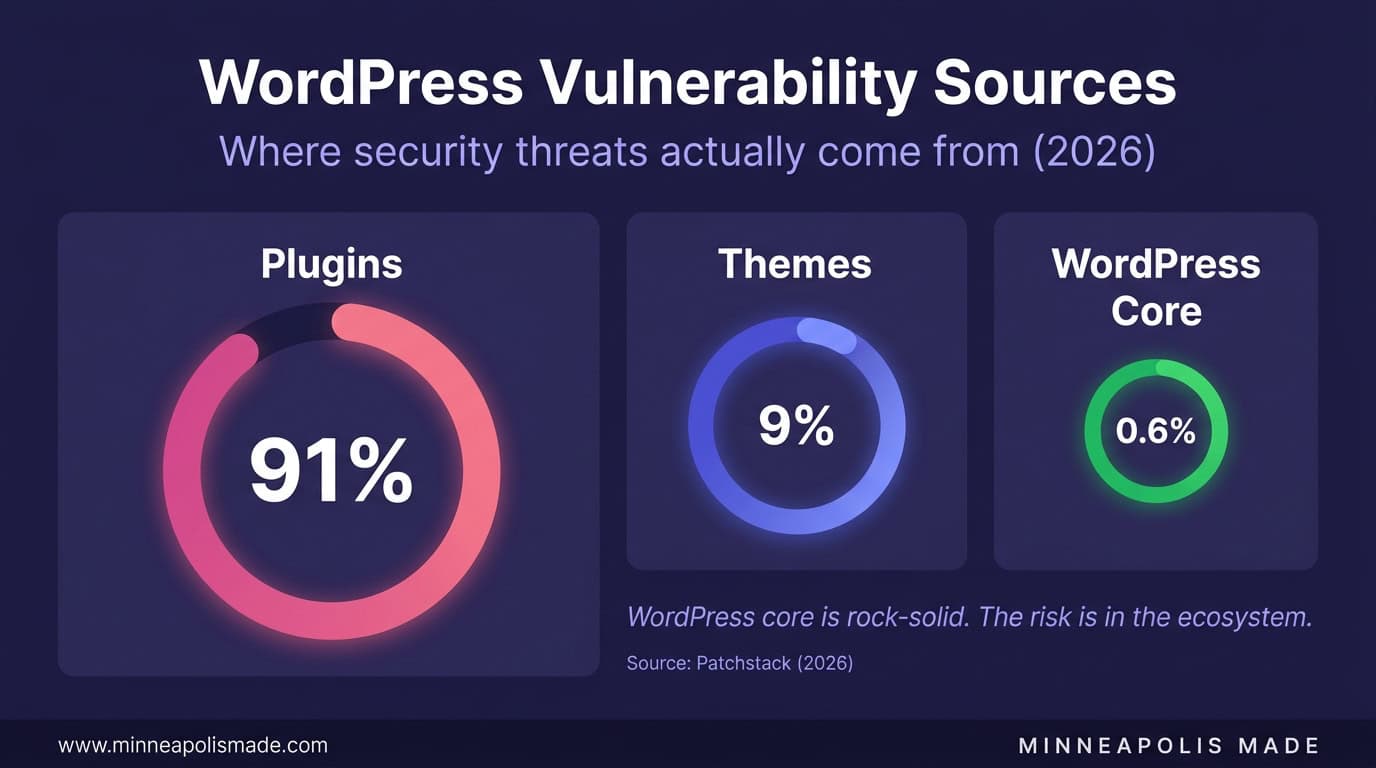
- 91% of WordPress security vulnerabilities come from plugins and themes, not WordPress core (Wordfence, 2022)
- Two-factor authentication blocks 99.9% of automated account compromise attacks (Microsoft, 2019)
- The average cost of a data breach for small businesses is $2.98 million (IBM Cost of Data Breach Report, 2024)
- Most WordPress hacks are preventable with 5 basic security practices that take under an hour to implement
How Vulnerable Is WordPress, Really?
According to Wordfence’s analysis (2022), 91% of all WordPress vulnerabilities originate in plugins and themes, not in WordPress core. The core software is actually well-maintained and quickly patched. The problem is the ecosystem. With 60,000+ plugins in the WordPress directory, the attack surface is enormous.
Sucuri’s 2023 Website Threat Research Report found that WordPress accounted for 96.2% of all CMS infections they remediated. That sounds alarming until you consider WordPress’s 43.5% market share. It’s not that WordPress is inherently insecure. It’s that it’s the biggest target because it’s the most popular.
The good news? Most attacks are automated and opportunistic. They scan for known vulnerabilities in outdated plugins. If your site is updated and hardened, the bots move on to easier targets. Security isn’t about being impenetrable. It’s about being harder to hack than the site next door.
Unique Insight
We tell our Minneapolis clients: WordPress security is like locking your car in a parking lot. You don’t need a bank vault. You just need to not be the car with the windows down. Most automated attacks give up after the first failed attempt and move to the next target.
What’s the Most Common WordPress Security Mistake?
Running outdated plugins. It’s not close. According to Patchstack (2026), outdated plugins with known vulnerabilities are the number one attack vector for WordPress sites. Attackers don’t need to find new vulnerabilities. They just scan for sites running plugins with published security patches that haven’t been applied.
Every WordPress plugin update includes a changelog. When that changelog mentions a “security fix,” it means a vulnerability was discovered and patched. The moment that patch is published, attackers know exactly what to look for on unpatched sites. You’re in a race, and every day you delay an update, you’re falling behind.
How to Fix It
- Enable automatic updates for all plugins in WordPress settings
- Or update manually every week, same day, same time. Make it a habit.
- Remove any plugin you’re not actively using. Deactivated plugins are still attackable.
- Before updating, take a backup. Use UpdraftPlus (free) or your host’s backup system.
- If a plugin hasn’t been updated by its developer in 12+ months, find a maintained alternative.
Personal Experience
We audit WordPress sites for Minneapolis businesses regularly. In about 70% of audits, we find at least one plugin that hasn’t been updated in 6+ months. In about 30%, we find plugins that have been abandoned by their developers entirely, sitting on the site as open vulnerabilities. The fix takes 15 minutes.
Related: Website Speed Optimization: The Real Cost of a Slow Website
Why Is Using ‘Admin’ as a Username So Dangerous?
Brute force attacks try “admin” as the username first. Always. It’s the default WordPress admin username, and despite years of warnings, a significant percentage of sites still use it. Combined with common passwords, it’s the easiest way into a WordPress site.
According to Wordfence’s threat intelligence data, their firewall blocks an average of 5.6 billion malicious requests per month across their network. A large portion of those are brute force login attempts targeting common usernames.
How to Fix It
- Create a new administrator account with a unique username (not “admin”, not your email, not your name)
- Transfer all content ownership to the new account
- Delete the old “admin” account
- Use a password manager (1Password, Bitwarden) to generate and store a 20+ character random password
- Limit login attempts with a plugin like Limit Login Attempts Reloaded or Wordfence
How Effective Is Two-Factor Authentication?
Microsoft’s security research (2019) found that two-factor authentication prevents 99.9% of automated account compromise attacks. That’s not a typo. 99.9%. If you do nothing else on this list, enable 2FA.
For WordPress, the setup takes about 5 minutes:
- Install Wordfence or a dedicated 2FA plugin like WP 2FA
- Enable 2FA for all administrator and editor accounts
- Use an authenticator app (Google Authenticator, Authy, 1Password) not SMS
- Save backup codes somewhere secure in case you lose your phone
SMS-based 2FA is better than nothing but vulnerable to SIM swapping. App-based 2FA (TOTP) is the standard recommendation. Hardware keys (YubiKey) are the gold standard but overkill for most small business sites.
Original Data
Of the hacked WordPress sites we’ve remediated for Minneapolis businesses, zero had 2FA enabled. Not one. Every single compromised site relied on username and password alone. This is the single most impactful security change you can make, and it’s free.
Related: How to Choose a Web Development Agency
Does Your Hosting Provider Actually Matter for Security?
Yes. The difference between $3/month shared hosting and $30/month managed WordPress hosting is largely a security difference. Managed hosts like WP Engine, Flywheel, and Kinsta include server-level firewalls, automated malware scanning, DDoS protection, and automatic WordPress core updates. Cheap shared hosting includes none of these.
On shared hosting, your site shares a server with hundreds of other sites. If one of them gets compromised, the attacker can potentially access your files through the shared server environment. Managed hosting isolates each site in its own container.
What Good Hosting Includes
- Web Application Firewall (WAF): Blocks malicious requests before they reach WordPress
- Malware scanning: Daily automated scans for known malware signatures
- Automatic backups: Daily snapshots with 30-day retention
- SSL certificate: Free Let’s Encrypt or premium certificate included
- DDoS protection: Absorbs traffic floods without your site going down
- Staging environment: Test updates before applying to production
Personal Experience
We moved a Minneapolis professional services firm from $8/month shared hosting to WP Engine managed hosting. Within the first month, WP Engine’s firewall blocked over 12,000 malicious requests that had been hitting the site unfiltered on shared hosting. The site also loaded 2x faster. The $30/month investment paid for itself immediately in security alone.
Related: WooCommerce vs Shopify: Which Platform Wins for Minneapolis Retailers?
What Happens When You Don’t Have Backups?
According to IBM’s 2024 Cost of Data Breach Report, the average cost of a data breach for organizations with fewer than 500 employees is $2.98 million. For a small business WordPress site, a hack without backups means rebuilding from scratch: recreating pages, re-uploading content, reconfiguring plugins, and losing SEO equity while the site is down.
Daily automated backups stored off-site (not on the same server as your site) mean you can restore a clean version in minutes. Here’s the backup checklist:
- Frequency: Daily for active sites, weekly minimum for brochure sites
- Storage: Off-site (Google Drive, Dropbox, Amazon S3), not just on your server
- Scope: Both files AND database. One without the other is useless.
- Testing: Restore a backup at least once per quarter to verify it actually works
- Tools: UpdraftPlus (free, reliable), BlogVault ($89/year, automated), or your managed host’s built-in system
The worst time to think about backups is after you need one.
Not sure if your WordPress site is secure?
We’ll run a full security audit: check your plugins for vulnerabilities, verify your backup system, test your login security, and scan for existing malware. Most sites have at least 2 critical issues hiding in plain sight.
Related: Local SEO for Small Business: The Complete Minneapolis Strategy Guide
Related: WordPress development and security services
Related: Managed WordPress hosting and maintenance
Related: WordPress web design in Minneapolis
Related: How WordPress powers business growth and how to protect it
Frequently Asked Questions
Is WordPress inherently insecure?
No. WordPress core is well-maintained and quickly patched. 91% of vulnerabilities come from plugins and themes (Wordfence, 2022). A WordPress site with updated plugins, 2FA, and managed hosting is as secure as any platform. The perception of insecurity comes from the massive number of poorly maintained WordPress sites, not from the software itself.
What’s the best WordPress security plugin?
Wordfence (free version) is the most comprehensive option for most small businesses. It includes a firewall, malware scanner, login security, and 2FA. Sucuri is the alternative for businesses that want cloud-based WAF protection. You don’t need both. Pick one and configure it properly.
How often should I update WordPress plugins?
Weekly at minimum. Enable automatic updates for trusted plugins if you want less maintenance. Always update immediately when a security patch is released (you’ll see “security fix” in the changelog). Take a backup before updating, and test your site after each batch of updates.
What should I do if my WordPress site gets hacked?
First, restore from your most recent clean backup. If you don’t have backups, hire a professional (Sucuri, Wordfence, or a local agency) to clean the infection. Change all passwords (WordPress, hosting, FTP, database). Enable 2FA. Update everything. Then figure out how the attacker got in and close that door.
Do I need a security plugin if I have managed hosting?
Managed hosting covers server-level security (firewall, malware scanning, DDoS protection). A security plugin like Wordfence adds application-level protection (login security, file integrity monitoring, vulnerability alerts). They complement each other. For most Minneapolis small businesses, managed hosting plus Wordfence free is the right combination.